How to care for Snake Plants
Simple, low-maintenance tips to keep your snake plant thriving—watering schedule, light needs and repotting advice.
Learn more →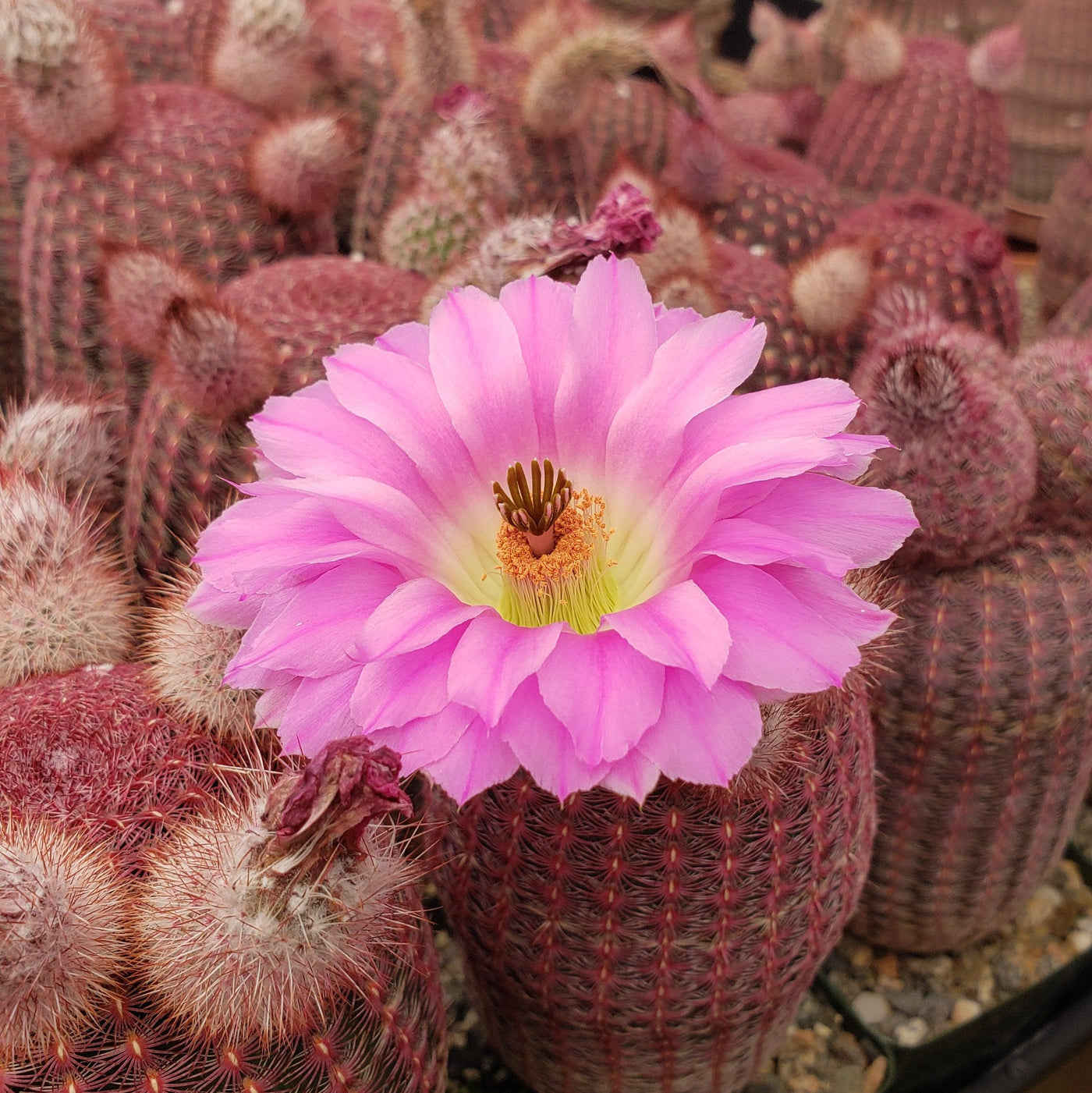
Pay in installments of $5.40 with
 ,
,
 and
and

Ships within 48 hours · Estimated delivery Sep 3 - Sep 8
 Promo Codes Available:
For Your Every Summer RSVP, with Code: SUMMER15
rainbow succulent plants for sale Buy "Rainbow Hedgehog Cactus - Echinocereus rigidissimus rubispinus" Care and InfoIntroducing the vibrant rainbow hedgehog cactus, known as Echinocereus rigidissimus rubispinus. This stunning columnar cactus is a variety of the Echinocereus rigidissimus (rainbow cactus), distinguished by short, dusty red purple spines and dull purple red stigma lobes. Native to the southwestern United States and northwestern Mexico, this rainbow hedgehog cactus plant has several other common names, such as Echinocereus pectinatus rubispinus, ruby
Introducing the vibrant rainbow hedgehog cactus, known as Echinocereus rigidissimus rubispinus. This stunning columnar cactus is a variety of the Echinocereus rigidissimus (rainbow cactus), distinguished by short, dusty red-purple spines and dull purple-red stigma lobes.
Native to the southwestern United States and northwestern Mexico, this rainbow hedgehog cactus plant has several other common names, such as Echinocereus pectinatus rubispinus, ruby rainbow, Arizona rainbow cactus, and rainbow cactus. This rainbow hedgehog cactus is a small to medium-sized columnar cactus that typically grows up to 10 inches tall and 8 inches wide.
The term "rubispinus" in the scientific name Echinocereus rigidissimus rubispinus refers to the ruby-reddish spines of the cactus. "Rubis" is derived from the Latin word for "red," while "spinus" refers to spines.
The spines are long and rigid, providing protection against predators and helping to reduce water loss through evaporation.
The body of the rainbow hedgehog cactus itself is cylindrical and covered in a waxy coating, giving it a unique texture and appearance.
The flowers of the rainbow hedgehog cactus produce stunning trumpet-shaped blooms in shades of bright pink at the top of the cactus during the late spring and summer months. They are usually about 2–3 inches in diameter and attract pollinators such as bees and butterflies.
Often, people worry they aren't giving their cactus plants enough water when, in reality, they are over-watering them. This is especially the case with rainbow hedgehog cacti, as they don't do well in too much moisture, which can result in root rot.
In the spring and summer, during the growing season, you can water the cactus once every 2-3 weeks, allowing the soil to dry out completely between waterings. In the fall and winter, during the dormant season, you can reduce watering to once every 4-6 weeks or even less, as the cactus requires less water during this time.
It's best to wait until the top two inches of soil are completely dry before watering. Watch out for signs of dehydration, such as a pale discoloration and shriveled stem, indicating that your ruby rainbow cactus is consuming its interior water supply. Besides hydrating correctly, it's also crucial to ensure that the potting soil drains quickly to avoid damaging cactus roots.
Remember, it's always better to underwater than to overwater, as cacti are adapted to survive in dry environments.
When growing indoors, the Rainbow Hedgehog Cactus enjoys bright, indirect light. Place it near a window where it can receive plenty of bright sunlight, but make sure to protect it from intense, direct sunlight, as it can scorch the delicate cactus. A south or east-facing window is usually a good spot. If you don't have access to bright natural light, you can also use artificial grow lights to provide the necessary light for your cactus.
If you are growing it outdoors, it's important to acclimate it gradually to prevent sunburn. Start by placing it in a shady spot for a few hours a day, gradually increasing the exposure to direct sunlight over a couple of weeks. Once acclimated, the cactus thrives in full sun, so find a sunny spot in your garden or patio where it can receive at least six hours of direct sunlight per day.
If you notice that your rainbow cactus is stretching or leaning toward the light source, it may be an indication that it needs more sunlight. On the other hand, if the rainbow plant starts to show signs of sunburn, such as yellowing or browning of the skin, it may be getting too much direct light.
Just remember to protect it from extreme heat or prolonged exposure to the harsh afternoon sun during the scorching summer months. By providing the Rainbow Hedgehog Cactus with the right amount of bright, indirect light, you can help it thrive and maintain its vibrant colors.
Ruby Rainbow prefers very airy, porous, nutrient-rich soil with a pH of 5.6–6.5. Cacti require fast-draining soil that dries completely between waterings. Your soil must have a sandy texture and a low water-holding capacity, just like desert soil.
As an alternative, you can create your own potting mix by combining equal portions of perlite, coarse sand, and good natural potting soil. Ideally, you want to use our specialized cactus potting mix that contains 5 natural substrates and organic mycorrhizae to promote the development of a strong root system that helps your rainbow hedgehog cactus to thrive.
When it comes to fertilizing the Rainbow hedgehog cactus, it doesn't require frequent feeding. During the growing season, which is typically spring, you can use a balanced cactus fertilizer, NPK (5-10-5), once a year. However, during the dormant period in fall and winter, it's best to avoid fertilizing altogether.
Remember, it's important not to over-fertilize your rainbow hedgehog cactus, as this can lead to nutrient burn and other issues. Always follow the recommended dosage and frequency.
When growing indoors, your Echinocereus rigidissimus var. rubispinus thrives at average room temperatures between 65°F and 80°F. It can tolerate slightly cooler temperatures during the winter months, down to around 50°F, but it's best to avoid extreme temperature fluctuations. As for humidity, this cactus is native to arid regions and prefers low humidity levels, similar to what you would find in most homes.
For outdoor cultivation, the rainbow hedgehog cactus is typically best suited in USDA zones 8–11. These zones generally have mild winter temperatures, with minimum average temperatures ranging from 20°F to 40°F.
However, it's best to protect the rainbow hedgehog cactus from freezing temperatures and frost for extended periods, as prolonged exposure to extreme cold can damage or kill your Echinocereus rigidissimus ssp rubispinus.
The Rainbow Hedgehog Cactus is known to attract a variety of friendly pollinators such as bees, butterflies, and hummingbirds with its vibrant blooms and sweet nectar. These pollinators play a crucial role in the cactus's reproduction by transferring pollen from one flower to another, ultimately leading to the production of seeds.
According to ASPCA, the Rainbow Hedgehog Cactus is non-toxic to humans and pets. It is safe to touch etc and does not pose any toxicity risks if accidentally ingested.
You can propagate these rainbow hedgehog cacti by either offsets or seeds. To take an offset, carefully remove some roots while keeping others attached. Allow them to dry in the open air until a callus forms on the cut end. Then, plant in cactus potting soil in a bright, warm location.
- It is known for its stunning, large magenta-pink blooms, which make it a popular flowering cactus.
- This cactus features densely packed, ruby-red spines that form intricate, symmetrical patterns, giving it an ornamental appeal even when not in bloom.
- This drought tolerant plant is well-suited to arid environments and thrives with minimal watering, making it an excellent choice for xeriscaping.
- It can tolerate temperatures as low as 20°F in dry conditions and is surprisingly resistant to light frosts.
Overall, the Rainbow Hedgehog Cactus (Echinocereus rubispinus) is a stunning and unique plant with its vibrant colors and spiky appearance. It's a relatively low-maintenance cactus that can thrive both indoors and outdoors, depending on your climate. It prefers average room temperatures indoors and can handle a range of temperatures outdoors, as long as it's not too cold or too hot. When it comes to care, make sure to provide well-draining soil, ample sunlight, and water sparingly, allowing the soil to dry out between waterings. With a little love and attention, this cold-hardy, colorful cactus will surely brighten up your space.
Give it a try, and enjoy the beauty and intrigue this unique Echinocereus rigidissimus rubispinus - rainbow hedgehog cactus brings to your home or garden!