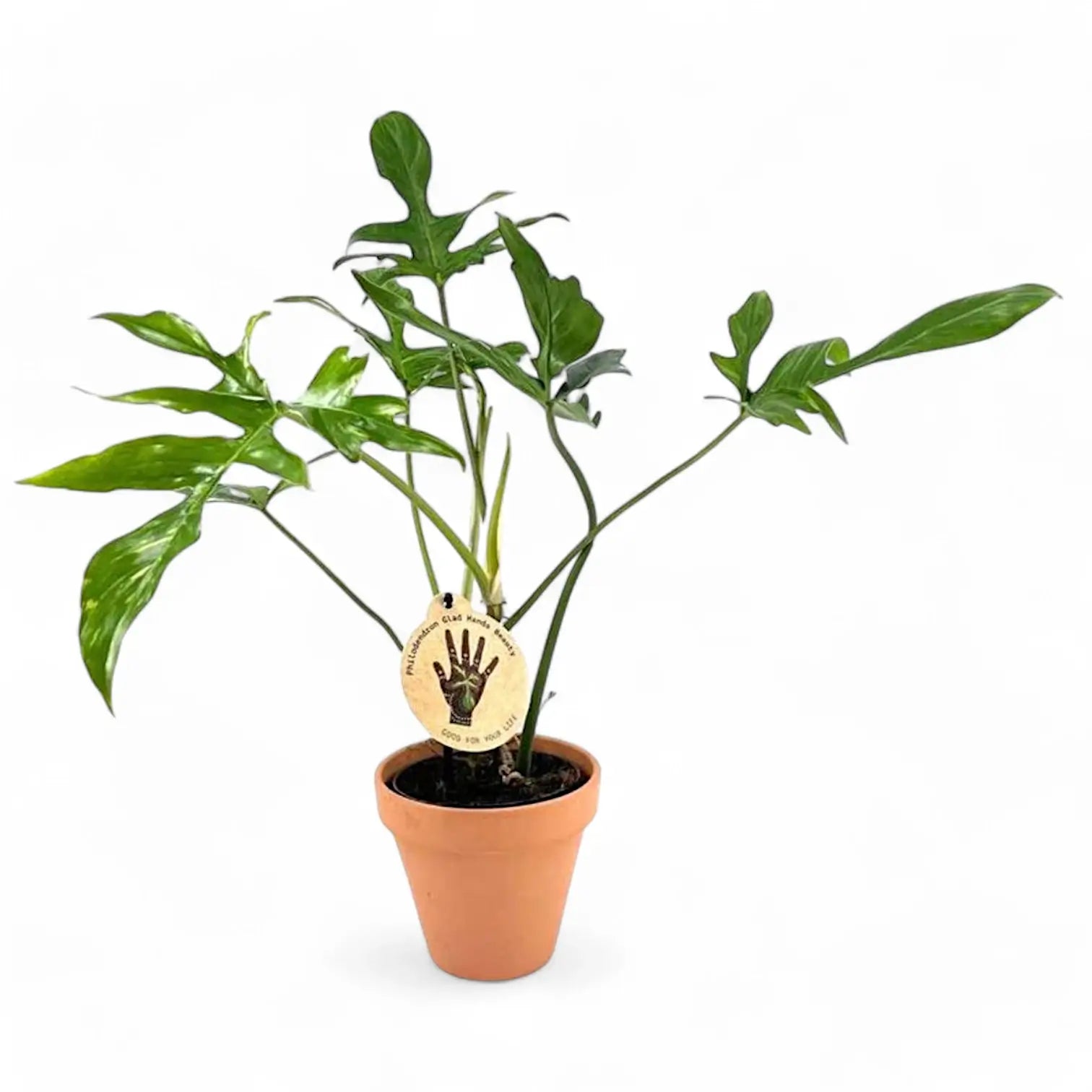
SKU: 12152173033
gladhands philodendron

gladhands philodendron Philodendron Glad Hands

Sale price$21.43 Regular price$23.81
Save 10%

Pay in installments of $5.95 with ShopPay, AfterPay and Klarna

Shipping Estimate
USA
  • USA
  • CAN

Ships within 48 hours · Estimated delivery Aug 3 - Aug 8

Promo Codes Available:

For Your Every Summer RSVP, with Code: SUMMER15

Description

gladhands philodendron Philodendron Glad HandsPhilodendron 'Glad Hands' (quercifolium) Philodendron 'Glad Hands' is a narrow form of Philodendron pedatum, grown for deeply divided leaves with long, slim lobes that spread from the blade like fingers. The full leaf shape develops over time, so young plants can look slimmer and less divided before the stem gains size and support. This plant grows from a climbing stem with clear nodes and aerial roots. As the stem extends, each node can produce

Philodendron 'Glad Hands' (quercifolium)

Philodendron 'Glad Hands' is a narrow form of Philodendron pedatum, grown for deeply divided leaves with long, slim lobes that spread from the blade like fingers. The full leaf shape develops over time, so young plants can look slimmer and less divided before the stem gains size and support.

This plant grows from a climbing stem with clear nodes and aerial roots. As the stem extends, each node can produce another leaf and attach to support through new root points. A pole, plank, or trellis helps the plant anchor, keeps the stem upright, and gives divided leaves space to spread.

Narrow lobes and node-by-node growth

  • Growth habit: Climbing Philodendron with nodes, aerial roots, and a stem that responds well to vertical support.
  • Leaf shape: Long, narrow lobes give older leaves a hand-like outline.
  • Development: Leaf divisions become clearer as the plant gains size, support, and stronger root growth.
  • Petiole spread: Leaves are held away from the stem, so established plants need space around the support.
  • Root behaviour: Aerial roots help the climbing stem attach and support larger foliage over time.

Pedatum background and quercifolium name

Philodendron pedatum (Hook.) Kunth was published in Enumeratio Plantarum 3:49 in 1841. It is an accepted South American species that grows as a climber in wet tropical habitats. Philodendron quercifolium Engl., published in Botanische Jahrbücher für Systematik 26:546 in 1899, is now placed under Philodendron pedatum.

The quercifolium name refers to oak-like divided leaves and still appears around this plant in cultivation. This narrow form shows a slimmer, more finger-like expression of pedatum-style leaf division once the stem is rooted and climbing. Older leaves gain a more defined outline, not just a larger size.

Care for divided leaves

  • Light: Provide bright filtered light. Strong indirect light supports shorter internodes and more developed leaves, while harsh direct sun can scorch exposed lobes.
  • Watering: Water thoroughly once the upper substrate has dried slightly. Keep moisture steady during active growth, but do not leave the pot standing in water.
  • Substrate: Use a chunky aroid mix with bark or coco chips, perlite or pumice, and a moisture-holding base. The roots need both moisture and air around them.
  • Pot choice: Choose a pot with drainage holes and enough depth to hold the support firmly. Avoid oversized pots that keep the lower stem wet for too long.
  • Repotting: Repot when roots fill the pot or the support becomes unstable. Move up gradually so the root zone stays aerated.
  • Support: Add a pole, plank, or trellis early. Attach the stem loosely so aerial roots can reach the support without being crushed.
  • Humidity: Aim for moderate to high humidity. Around 50–70% helps the narrow lobes open without dry tips or tears.
  • Temperature: Keep at about 18–28°C. Cool, wet conditions slow root activity and can damage the lower stem.
  • Feeding: Feed lightly during active growth with a balanced fertiliser. Reduce feeding when light and leaf production slow down.
  • Growth rate: Expect moderate climbing growth once rooted and supported. Leaf shape improves gradually as the stem strengthens.
  • Pruning: Remove yellowing leaves and trim stretched stems above a node if the plant needs reshaping. Healthy cut sections can be used for propagation.
  • Placement: Give the plant room around its support so the lobed leaves can spread without rubbing against walls, shelves, or neighbouring plants.
  • Semi-hydroponics: This Philodendron can adapt to mineral or semi-hydro substrates if roots are transitioned gradually and the reservoir is kept clean.
  • Propagation: Take stem cuttings with at least one node and preferably an aerial-root nub. Keep cuttings warm and humid while roots form.

Juvenile leaves, torn lobes and stem stretch

  • Leaves staying juvenile: Check support, light, and root health. A divided leaf shape develops more reliably on a climbing, well-rooted stem.
  • Yellow lower leaves: Inspect the substrate and roots. Persistent wetness around the lower stem can cause older leaves to decline quickly.
  • Brown lobe tips: Look for dry roots, low humidity, fertiliser buildup, or hot sun through glass.
  • Long gaps between leaves: The stem may be reaching for light or growing away from its support. Move it into brighter filtered light and secure new growth.
  • Torn new leaves: New lobes can catch while unfurling. Keep watering stable and humidity moderate rather than forcing the leaf open.
  • Loose stem attachment: If the stem pulls away from the support, retie it gently at the nodes and guide new aerial roots toward the surface.
  • Pests: Check leaf undersides, petiole bases, and cataphylls for thrips, mites, scale, and mealybugs.

Pet safety and skin irritation

Philodendron 'Glad Hands' should be kept away from pets and children that may chew leaves or stems. Philodendron contains calcium oxalate crystals, which can irritate the mouth, throat, and digestive tract if ingested. Sap may irritate sensitive skin after pruning or propagation.

Name meaning and botanical background

Philodendron means “tree-loving”, a reference to the climbing habit common in the genus. The epithet pedatum means foot-like, matching the divided leaf outline of Philodendron pedatum. Quercifolium combines Latin roots for oak and leaf, referring to an oak-like leaf shape. The name 'Glad Hands' suits the hand-like spread of the leaf lobes.

Choose Philodendron 'Glad Hands' for a climbing Philodendron with slim, fingered leaves and a distinctive narrow-lobed outline.

Shipping Notes
  • Free Standard Shipping on $100+ Orders to the USA.
  • Except Preorder products are shipped in 48 hours.
  • Delivery to the USA:
  1. Standard Shipping : 3-10 business days
  • If time is of the essence, please consider selecting expedited delivery for faster service.
Exchange/Return Notes
  • We offer a 30-day return/exchange service after receiving.
  • Final sale items are not eligible for returns or exchanges.
  • To process your return/exchange, please contact us at [email protected]
  • Please click here for more details>>> Return & Exchange Policy
SKU: 12152173033

Discover Niche Categories That Outsell gladhands philodendron

Top-Converting Item to Boost Your Average Order

4.3 ★★★★★
Based on 16 reviews
Sort
Highest Rating
Newest First
Oldest First
Product Reviews
J
Verified Purchase
Joyce Saint-Cyr
Carnegie, US
★★★★★ 5
Beyond Impressed
Color: Space grey
I recently picked up the Acer 7-in-1 USB-C Hub and I have to say, I am beyond impressed with its performance and functionality. As someone who frequently uses a laptop for both work and personal tasks, this little device has completely changed the way I connect my peripherals and external devices. What I Love: Compact Design & Build Quality: Despite packing so many ports into such a small form factor, the Acer USB-C Hub is surprisingly lightweight yet feels sturdy. The sleek aluminum finish not only looks professional but also helps keep things cool during extended use. It’s incredibly portable and fits easily in my bag alongside my laptop. Wide Range of Ports: This hub includes 7 different ports, which is a dream for anyone who needs to expand their connectivity. It includes: HDMI port (4K support) for connecting to external monitors or TVs, USB 3.0 ports (two) for fast data transfer or connecting peripherals like keyboards, mice, or external hard drives, SD and MicroSD card readers (perfect for photographers or videographers), Ethernet port for reliable wired internet connections (a must for stable work-from-home setups), USB-C power delivery port for charging your laptop while using the hub. Whether you're using it for office tasks, media consumption, or creative work, this hub has you covered. Plug & Play: I’m a huge fan of how easy this hub is to use. There’s no need for extra drivers or software. Simply plug it into your USB-C port, and it’s ready to go! My MacBook, Windows laptop, and even my tablet all recognized the device instantly without any issues. Fast and Stable Performance: I’ve tested the data transfer speeds using both USB drives and external hard drives, and the speeds are consistently fast. The HDMI output worked seamlessly, delivering crisp 4K video to my TV without any lag or glitches. The Ethernet connection is a lifesaver when I need a stable internet connection for remote work or video calls. Affordable Price: Considering the versatility and quality, the price of this hub is a steal! Many hubs in this range only offer a handful of ports, but Acer’s 7-in-1 gives you a full suite of connectivity options at a great value. A Couple of Notes: Heat Management: During extended use, the hub can get a little warm, especially if you're using the HDMI output or transferring large files. However, it never got hot enough to be a concern, and it hasn’t impacted performance at all. Compatibility: While it works perfectly with laptops that have a USB-C port with power delivery, make sure your device supports it for full functionality. I haven’t had any issues with my devices, but it’s always a good idea to check your specs. Final Verdict: The Acer 7-in-1 USB-C Hub is an absolute game-changer for anyone looking to maximize their laptop’s connectivity. It’s a perfect solution for professionals, creatives, and anyone who needs to connect multiple devices without the clutter of extra adapters. I highly recommend it to anyone who wants to simplify their tech setup while maintaining top-notch performance! If you're looking for a versatile, high-quality USB-C hub, this is the one to get.
WAS THIS REVIEW HELPFUL?YesReportShare
Reviewed in the United States on December 24, 2024
O
Verified Purchase
OG Ro
Fort Morgan, US
★★★★★ 5
Works as intended
I've been into emulators lately and this is a great HDMI out with charging capabilities to go with your high speed charging brick. Doesn't work for everything, but I can attest it works with the AYN Thor and a Google Pixel 8 Pro, and presumably higher end Pixels. Both have emulators and both come thru my TV just fine. Also works with Kodi. I tried to use wired controllers, but quickly figured I'm better off going Bluetooth on that route. I haven't tried file transfer or anything because all that mattered to me was getting it to the big screen. I'd rather have a docking stand for my needs, but freedom and flexibility isn't a bad thing for this device at a decent price and cheaper than a dock.
WAS THIS REVIEW HELPFUL?YesReportShare
Reviewed in the United States on May 10, 2026
C
Verified Purchase
Charlie Price
Charlottesville, US
★★★★★ 5
Versatile hub adds the ports my Mac lacks
This 7-in-1 USB C hub from Anker has made it easy to connect my laptop to all the devices I need. The HDMI port consistently outputs 4K video at 60Hz, while the USB 3.0 ports and SD/microSD slots transfer files quickly without errors. I appreciate that the pass-through charging allows me to power my MacBook while using the hub, and the unit itself feels solid and well made. It's truly plug-and-play, with no drivers to install, and it greatly expands the limited port selection on modern laptops. The only minor drawback is that the hub can get a little warm under heavy use, but overall it's a reliable, convenient accessory that I feel confident recommending.
WAS THIS REVIEW HELPFUL?YesReportShare
Reviewed in the United States on March 26, 2026
M
Verified Purchase
M M
Cuba, US
★★★★★ 5
Awesome USB-C Hub
My new MacBook Air has USB-C ports only, so I recently upgraded to this USB-C hub, a 7in1 Multi-Port USB-C Adapter, and it has completely solved all of my port needs. With the two USB-A ports, I can still use my old memory sticks, without replacing them, as well as two USB-C ports, all making moving files, movies and pictures, with ease. I needed something fast and reliability, and this little device delivers on both fronts. One of the USB-C ports it a power passthrough, which works great for charging device, like my MacBook Air. It is very easy to use, just plug and play, making it compatible with the MacBook Air. Also has a built in card reader, and a HDMI port, pretty much covering all your port needs. If you are looking for a well built, reliable, fast, and compact USB-C hub that can everything, this is the one to get. Highly recommended!
WAS THIS REVIEW HELPFUL?YesReportShare
Reviewed in the United States on May 5, 2026
M
Verified Purchase
Michael Breinig
Natrona Heights, US
★★★★★ 5
Good value and best of all - it works
This did the job I wanted it to. Expanded the ports when my laptop just ran out. No delay or ANY issue no matter what I plugged where and after a little figuring out where things went (not difficult) its performing very well. As far as value, its great. I always evaluate something by if I would purchase it again. Yes I would. if you need it, get it and set it up and move on with less worry about port capacity.
WAS THIS REVIEW HELPFUL?YesReportShare
Reviewed in the United States on May 28, 2026

recommand products