Pay in installments of $6.57 with
 ,
,
 and
and

Shipping Estimate
USA
- USA
- CAN
- USA
- CAN
Ships within 48 hours · Estimated delivery Aug 9 - Aug 14
 Promo Codes Available:
For Your Every Summer RSVP, with Code: SUMMER15
Description
split rock succulent for sale Split Rock Succulent 'Pleiospilos nelii' mesembs - Fast DeliveryThe split rock succulent, known as Pleiospilos nelii mesembs, is an absolutely stunning succulent plant that belongs to the Mesembryanthemaceae family! "Mesembs" is a common term used to refer to plants in this family, which includes various succulents known for their unique adaptations to arid environments. The split rock succulent has several other common names, such as mimicry plant, cleft stone, or living rock cactus. It gets its name because its
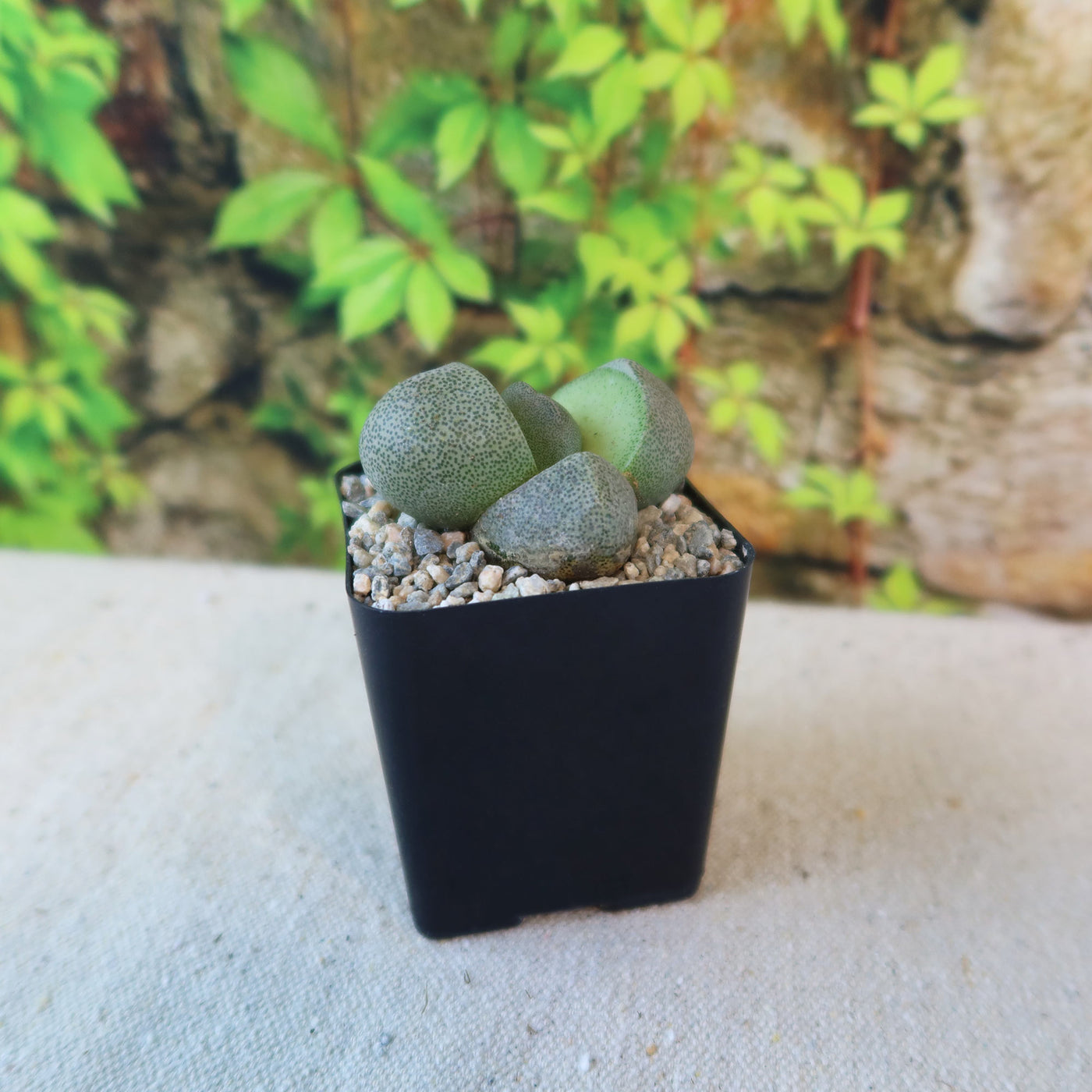
The split rock succulent, known as Pleiospilos nelii mesembs, is an absolutely stunning succulent plant that belongs to the Mesembryanthemaceae family! "Mesembs" is a common term used to refer to plants in this family, which includes various succulents known for their unique adaptations to arid environments. The split rock succulent has several other common names, such as mimicry plant, cleft stone, or living rock cactus. It gets its name because its leaves split open, revealing a cleft in the center. It looks like a rock that has been split in half!
The split rock plant and Lithops are often confused because of their striking similarities. The biggest distinction between the two is in how they blossom. Both plants bloom in the early fall, but Split Rocks produce multiple flowers in a single reproductive cycle, whereas Lithops only produces one flower at a time. The split rock succulent produces daisy-like flowers in a variety of colors, including orange, white, yellow, and magenta.
Native to South Africa, this egg-shaped succulent has two gray-green, thick, fleshy leaves that cleft down the center. New leaves grow at right angles to the split. It can typically grow up to 4 inches tall and 8 inches wide. This split rock plant also comes in the lovely Pleiospilos nelii "Royal flush" variety, which has deep purple to reddish foliage.
In terms of propagation, split rock plants can be propagated through seeds or by dividing the offsets that grow from the base of the parent plant. Additionally, this split rock is a friendly plant for both humans and pets, making it a popular choice among plant enthusiasts.
Watering Needs
When it comes to watering split rock succulents, it's important to remember that they have lower water needs than other succulents. These rock plants are adapted to arid environments, so they prefer infrequent watering. It's best to allow the soil to dry out completely between waterings to prevent overwatering, which can lead to root rot or bursting your concrete leaf plant.
One helpful tip is to use the "soak and dry" method. This means thoroughly watering your split rock plant until water drains out of the bottom of the pot through drainage holes, and then waiting for the soil to dry out completely before watering again. This helps mimic the natural rainfall patterns these succulents are accustomed to. Remember, it's always better to go underwater than to overwater when it comes to split rock succulents!
In addition to monitoring the soil moisture, it's also important to consider the environmental conditions. During the active growing season, which is typically spring and summer, split rock succulents may require more frequent watering. However, during the dormant period in fall and winter, they require less water.
Remember, a healthy Split Rock typically has two sets of leaves. If it develops more than two sets or shows cracking on its epidermis, it's time to stop watering. Avoid watering for at least a week if you notice these signs.
Light Requirements
When it comes to light requirements, split rock succulents thrive in partial shade to full sun. They prefer a sunny spot where they can receive ample sunlight, but it's important to protect them from intense, direct sunlight, especially during the hottest parts of the day.
A great location for split rock succulents is near a south or east-facing window, where they can receive bright, filtered light throughout the day. Consider purchasing grow lights if your Split Rock can't get enough light from a south-facing window or any other location. These can provide the necessary light intensity and duration for healthy growth. Just make sure to position the lights at an appropriate distance from the plants to avoid burning or overheating.
Remember, each plant is unique, so it's important to observe your split rock succulents and adjust the lighting conditions accordingly.
Optimal Soil & Fertilizer Needs
When it comes to soil and fertilizer needs, split rock plants prefer a well-drained soil mix specifically formulated for succulents. This type of soil allows excess water to flow out easily, preventing root rot. You can find pre-made succulent soil mixes at your local garden center, or you can create your own by combining equal parts of potting soil, perlite, and coarse sand.
Here at Planet Desert, we have a specialty-formulated succulent potting mix that contains 5 natural substrates and organic mycorrhizae to promote the development of a strong root system that helps your succulent to thrive.
As for fertilizing, Pleiospilos nelii split rock succulents have low nutrient requirements. It's best to use a balanced natural NPK fertilizer specifically formulated for succulents, and only apply once a year during the active growing season, which is typically early spring. Remember, it's better to under-fertilize than to over-fertilize, as excessive nutrients can harm these plants.
In general, it's important to avoid overfeeding split rock succulents, as they are adapted to nutrient-poor environments. Too much fertilizer can lead to weak growth and other problems. Always monitor the health and growth of your plants and adjust the fertilization routine as needed. If the leaves start turning yellow or the rock plant appears stressed, it may be a sign of nutrient imbalance or over-fertilization.
Hardiness Zone & More
Split rock succulents are typically indoor plants and generally hardy in USDA hardiness zones 9 to 11. They thrive in warm climates and can tolerate temperatures ranging from 50°F to 85°F. If you live in a region with extreme temperatures or higher humidity levels, you can still grow split rock succulents indoors or in a controlled environment, such as a greenhouse or terrarium, where you can maintain the ideal conditions for their growth. Just remember to monitor the temperature and humidity levels to ensure they stay within the recommended range.
In terms of humidity, the rock plants are adapted to arid conditions and prefer low to moderate humidity levels. They can tolerate dry air and do not require high levels of humidity. In fact, excessive humidity can increase the risk of fungal diseases and rot. It's best to provide good air circulation around the split rock to prevent moisture buildup.
Don't miss out on adding the Pleiospilos nelii - Split rock succulent to your garden! Order now and enjoy its beauty for years to come.
Shipping Notes
- Free Standard Shipping on $100+ Orders to the USA.
- Except Preorder products are shipped in 48 hours.
- Delivery to the USA:
- Standard Shipping : 3-10 business days
- If time is of the essence, please consider selecting expedited delivery for faster service.
Exchange/Return Notes
- We offer a 30-day return/exchange service after receiving.
- Final sale items are not eligible for returns or exchanges.
- To process your return/exchange, please contact us at [email protected]
- Please click here for more details>>> Return & Exchange Policy