Pay in installments of $7.24 with
 ,
,
 and
and

Shipping Estimate
USA
- USA
- CAN
- USA
- CAN
Ships within 48 hours · Estimated delivery Aug 2 - Aug 7
 Promo Codes Available:
For Your Every Summer RSVP, with Code: SUMMER15
Description
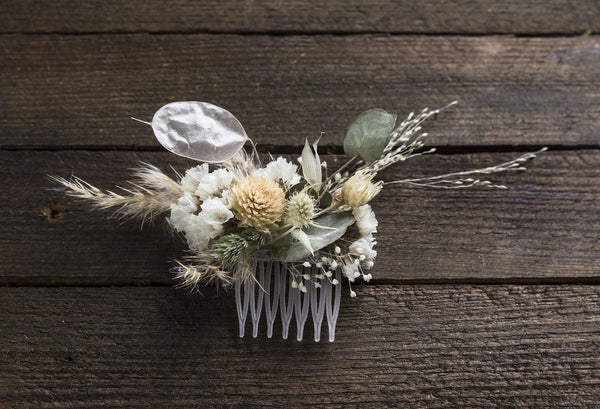
dried lunaria money plant Money Plant (Lunaria) Seeds - For 2026 Planting Non-GMO HeirloomMoney may not grow on trees, but it does grow on wildflowers! Money Plant, or Silver Dollar Plant, is an intriguing perennial featuring silvery translucent seedpods that grow to the size of silver dollars. They have been popular in dried flower arrangements since colonial times. The silvery seed pods can be harvested and dried to create stunning, long lasting arrangements or used in crafting projects. As the fragrant purple and white flowers bloom in
Money may not grow on trees, but it does grow on wildflowers! Money Plant, or Silver Dollar Plant, is an intriguing perennial featuring silvery translucent seedpods that grow to the size of silver dollars. They have been popular in dried flower arrangements since colonial times. The silvery seed pods can be harvested and dried to create stunning, long-lasting arrangements or used in crafting projects. As the fragrant purple and white flowers bloom in early spring, they attract pollinators like bees and butterflies, adding even more life to your garden. Lunaria is perfect for adding texture and interest to garden beds, borders, or floral arrangements. Money Plant is a low-maintenance plant that thrives in a variety of soils and requires minimal care, making it ideal for gardeners of all experience levels. Not only does it add a touch of elegance to your outdoor space, but Money Plant also symbolizes prosperity and good fortune, making it a perfect plant for bringing positivity into your garden or home.Also Known As: Money Plant, Honesty, Moonflower, Silver Pennies, Chinese Money, Lunaria, Silver Dollar Plant, Annual Honesty, Perennial Honesty, Silver Dollar, Moonwort, Chinese Lantern, Satin Flower.
| Plant Name: | Money Plant |
| Latin Name: | Lunaria annua |
| Days to Germinate: | 7-14 |
| Days to Bloom: | 365-730 |
| Plant Height: | 2 - 3 Feet |
| Spread: | 1 - 2 Feet |
| Bloom Diameter: | 1 - 2 Inches |
| Growth Habit: | Bush |
| USDA Zones: | 5-9 |
| Lifespan: | Biennial |
| Brand: | TomorrowSeeds |
| Sunlight: | Full Sun, Partial Shade |
| Pollination: | Heirloom, Open-Pollinated |
| GMO: | No |
| Fungicide-Treated Seeds*: | No |
| Seeds Packed For**: | 2026 |
**Seeds are freshly packed for the growing season of the year listed. Seeds are still viable beyond pack date. Store in a cool and dry location such as the refrigerator or basement to best preserve germination rates.
Planting Instructions:
Soil Preparation:
Choose an area with heavy, well-draining soil that receives at least 6 hours of sunlight each day. Remove weeds, large rocks, and litter from the planting area. Leave small weeds and dead grass, they will enrich the soil when turned under. Spade or till the soil 8-12 inches deep. Loosening the soil will help the plant establish strong roots.
Plants grow best in soil with lots of organic matter. You may optionally add fertilizer or organic material such as compost, leaves, or rotted hay to mix into the soil at this point. For small gardens, scatter 2-3 tablespoons of fertilizer evenly and work into the top 2-3 inches of soil for each hill or 2 foot by 2 foot planting area. For larger gardens, scatter 2-3 pounds of a complete fertilizer for each 100 square feet of planting area. Work fertilizer or organic material into the soil and leave the surface smooth.
Form rows of soil beds 4-6 inches high and at least 18 inches apart. This formation of ridges will help with drainage.
Planting:
Starting Indoors: For earlier blooms, you may optionally cold-stratify Money Plant seeds for at least 30 days then start planting indoors in containers 6-8 weeks before the last expected frost date in Spring, keeping seedlings at least 65F. Harden off then transplant seedlings outdoors in a sunny location when temperatures are consistently above 60F. To transplant seedlings, prepare a transplant hole outdoors in a sunny location. Remove the plants carefully from the pots or flats and set them in the transplant holes, burying some of the stem in the ground. Pack the soil loosely around the plant and leave a slightly sunken area around each plant to hold water. Water the plants after transplanting.
Directly Sowing: If directly sowing outdoors, plant after the first hard frost in early Spring to cold-stratify seeds. Plants will germinate in late Spring when the soil warms to at least 60F. Fall planting is not recommended unless planting outdoors in environments with mild, frost-free winters, or planting indoors with supplemental grow lights. For blooms in late Spring of the following year, sow outdoors after the first hard frost in Fall to cold-stratify seeds.
To plant, make holes 1/4 inch deep and spaced 12-18 inches apart down the rows of raised beds. Plant 1-3 seeds per hole, then cover thinly with soil. If choosing to thin, plant 2-3 weeds per hole, then remove plants to narrow to the strongest single plant per hole fter seedlings come up. Water after planting.
| Planting Depth: | 1/4 inch |
| Within-Row Spacing: | 12-18 inches |
| Between-Row Spacing: | 18-24 inches |
Care During the Season:
Watering: Water the plants deeply, soaking the soil to a depth of 6-8 inches, once a week. If there is no rainfall, water 2-3 times a week. Sandy soils may need to be watered more often than heavy clay soils.
Weeding: Keeping plants weed-free improves production. If plowing or hoeing, do not dig deeper than 1 inch to prevent from cutting the feeder roots.
Fertilizing: Once seedlings are established, 2-4 weeks after planting, you may optionally add a complete fertilizer every 4-6 weeks during the growing season. Read and follow fertilizer instructions for best application. Water plants after fertilizing.
Insecticides: Insecticides may be used to protect plants. Bt-based insecticides and sulfur are organic options that can be used for prevention. Sulfur also has fungicidal properties and helps in controlling many diseases. Before using a pesticide, read the label and follow cautions, warnings and directions.
Diseases: If spots or mold appear, treat plants with an approved fungicide. Neem oil, sulfur, and other fungicides may be used. When using fungicides always follow label directions.
Harvesting:
To harvest Money Plant for its decorative "silver dollar" seed pods, wait until the pods have fully matured and dried on the plant, typically in late summer to early fall of the second year or growth. In the first year, Money Plant blooms showy purple and white flowers. The outer layers of the pods will first appear green, then turn brown as they dry. Once they are completely dry, cut the stems at the base using pruning shears or scissors. To reveal the silvery, translucent inner layer, gently rub or peel away the outer brown husks of the seed pods. This can be done by hand or by lightly shaking the stems. Once cleaned, the silver-dollar-like discs can be used in dried floral arrangements or crafts. Store them in a dry place to prevent moisture damage and maintain their delicate appearance.
Shipping Notes
- Free Standard Shipping on $100+ Orders to the USA.
- Except Preorder products are shipped in 48 hours.
- Delivery to the USA:
- Standard Shipping : 3-10 business days
- If time is of the essence, please consider selecting expedited delivery for faster service.
Exchange/Return Notes
- We offer a 30-day return/exchange service after receiving.
- Final sale items are not eligible for returns or exchanges.
- To process your return/exchange, please contact us at [email protected]
- Please click here for more details>>> Return & Exchange Policy