Pay in installments of $5.48 with
 ,
,
 and
and

Shipping Estimate
USA
- USA
- CAN
- USA
- CAN
Ships within 48 hours · Estimated delivery Aug 10 - Aug 15
 Promo Codes Available:
For Your Every Summer RSVP, with Code: SUMMER15
Description
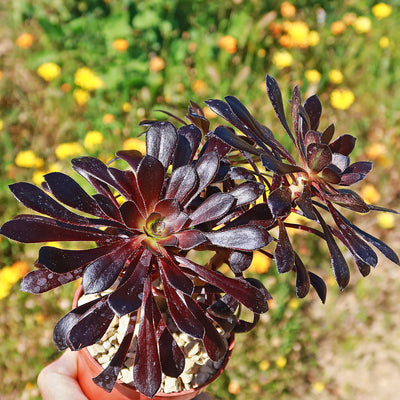
black and green succulent Shop 'Black Rose Succulent - Aeonium Zwartkop' Care and InfoIntroducing the black rose, known as Aeonium Zwartkop', a beautiful variety of Aeonium arboreum. The name "Black Rose" comes from its leaves, which have a deep purple black tint that resembles roses. It is not a rose, but a succulent plant from the Crassulaceae family. The black rose Aeonium zwartkop has several other common names, such as Aeonium arboreum zwartkop, Aeonium black rose, purple crest aeonium, Aeonium 'black beauty', or tree aeonium.
Introducing the black rose, known as Aeonium Zwartkop', a beautiful variety of Aeonium arboreum. The name "Black Rose" comes from its leaves, which have a deep purple-black tint that resembles roses. It is not a rose, but a succulent plant from the Crassulaceae family.
The black rose Aeonium zwartkop has several other common names, such as Aeonium arboreum zwartkop, Aeonium black rose, purple crest aeonium, Aeonium 'black beauty', or tree aeonium.
Hailing from the Canary Islands and reaching 5 feet in height and 3 feet in diameter at maturity, the black rose aeonium forms clumps and is sure to make a statement wherever it's planted.
When grown in full sun, the foliage takes on a deep, almost black color, which is why it's often referred to as the "Black Rose."
When grown in partial shade, the rosettes display a beautiful combination of purple-red hues with a green center. It's such a versatile plant that can add a touch of elegance and drama to any garden or succulent collection.
The flowers of Aeonium zwartkop bloom in the spring and produce clusters of small, yellow, star-shaped flowers that emerge from the center of its rosette-shaped foliage. The contrast between the dark purple-black leaves and the bright yellow flowers creates a stunning display. The flowers attract bees and other pollinators, adding life and movement to your garden.
Being a winter-growing plant, the Aeonium arboreum enters a state of dormancy during the scorching hot summer; during this time, the older leaves simply curl towards their points of growth rather than falling off entirely, giving the appearance of a black rosebud that is about to bloom. It's like a little garden masterpiece!
When and How to Water Your Black Rose
From fall through spring, during its active growing season, Aeonium 'Black Rose' should be watered every 7–10 days, only when the top 1-2 inches of soil is completely dry. This is when the plant is most active, producing new leaves and expanding its rosettes. If under-watered during the growing season, you may notice the stems shriveling and leaves slightly puckering, but they'll quickly bounce back once hydrated.
In the summer months, when the plant enters dormancy, watering is reduced drastically to every 2–4 weeks or less. Aeonium 'Black Rose' naturally slows its growth or temporarily halts it during hot summer weather, especially in warmer zones or indoor conditions.
The plant conserves moisture during this rest period, so watering too often can lead to leaf drop or root problems. Only water if the plant begins to look overly stressed or if the soil has been dry for a prolonged time, again, always check at least two inches deep before watering.
Light Requirements - Where to Place Your Black Rose Succulent
When growing the black rose succulent indoors, it's important to provide it with bright, indirect light for at least 4-6 hours a day. Keeping it in a well-lit area will help maintain the deep coloration of its leaves and promote healthy growth.
When grown outdoors, the black rose aeonium thrives in full sun to partial shade. In full sun, the foliage of this succulent turns almost black, which is why it's often referred to as the "Black Rose."
The intense sunlight brings out the deepest coloration in its leaves, creating a striking visual contrast. However, if you prefer a different look, placing it in partial shade will result in rosettes that display purple-reddish hues with a green center.
Remember, if your Aeonium 'Zwartkop' is exposed to too much direct sunlight and is not used to it, then there is a chance that the leaves might get damaged. It's critical to remember that during a heatwave or periods of extreme heat, your black rose succulent can get sunburned. You can protect the plant in this situation by moving it indoors or to a shaded area.
Optimal Soil & Fertilizer Needs
The Aeonium zwartkop prefers sandy, well-drained soil, as excess moisture can promote root and stem rot. Planting them in ordinary soil will result in compacted roots, stunted growth, and most likely root rot. Instead, make or buy a well-draining potting mix, or ideally use our specialized succulent potting mix that contains 5 natural substrates and mycorrhizae to promote the development of a strong root system that helps your Aeonium succulent to thrive.
A small amount (5-10-5) of NPK fertilizer once a year in the spring will do wonders for your plant's health and growth. Using a natural fertilizer ensures that other beneficial compounds and microbes are added to the soil without the use of harsh chemicals. Show your succulent some love with awesome natural fertilizer and watch it thrive.
Optimal Indoor Temperature & Humidity
Aeonium 'Black Rose' thrives indoors at temperatures between 65–75°F with low to moderate humidity levels around 30–50%.
Keep your Aeonium away from cold drafts, heating vents, and sudden temperature changes. Place it near a bright window with indirect light, and ensure the space remains dry and airy to mimic its native Mediterranean-like climate.
Hardiness Zones & More
In the United States, this is mostly an indoor plant, but if you live in southern Florida or Hawaii, then you can cultivate it outdoors in USDA zones 9-12.
They are not cold- or frost-tolerant, you should plant them indoors or put them in a pot.
Move them indoors during the winter if you live outside of these regions.
As for humidity, this succulent is adaptable and can tolerate average indoor humidity levels. However, it's important to provide good air circulation to prevent any issues with excessive moisture or stagnant air.
Wildlife - Black Rose Succulent Attracts the Following Friendly Pollinators
The Black Rose Succulent is known to attract a variety of friendly pollinators such as bees, butterflies, and hummingbirds with its vibrant blooms and sweet nectar. These pollinators play a crucial role in the plant's reproduction process by transferring pollen from one flower to another, ultimately helping the succulent thrive and produce seeds.
According to the ASPCA, the Black Rose Succulent is non-toxic to humans and pets. It is safe to touch and is a popular choice for indoor houseplants due to its unique appearance and low maintenance requirements.
How to Propagate Your Black Rose Succulent
To propagate the black rose aeonium, one common method is through stem cutting. Simply take a healthy stem from the mature plants, making sure it is at least a few inches long. Allow the cutting to dry for a few days to form a callus, which helps prevent rotting. Then, plant the cutting in well-draining soil and keep it lightly moist until roots develop. With minimal water and full sun exposure requirements, this perennial is perfect for those looking for a low-maintenance addition to their garden or indoor space.
Key Takeaways
- The Black Rose Succulentis famous for its dramatic, rosette-shaped foliage in deep burgundy to nearly black hues, making it a striking focal point in any garden or collection.
- In late winter to early spring, mature plants produce tall stalks with clusters of bright yellow, star-shaped flowers, creating a striking contrast against the dark foliage.
- Aeonium ‘Zwartkop’ is highly drought-tolerant, requiring minimal watering, making it an excellent choice for xeriscaping or low-maintenance gardening.
- This winter-growing perennial, enters dormancy during hot summers, with older leaves curling towards growth points, resembling a black rosebud about to bloom.
Final Thoughts
Overall, the Aeonium zwartkop (black rose) is a unique and elegant succulent that can be a great addition to any indoor or outdoor space. Its dark foliage adds elegance and can be easily cared for with bright, indirect light indoors or full sun to partial shade outdoors. Keep your black rose aeonium away from cold, drafty windows and air vents if you are growing them indoors in a cold climate. The plant's distinctive black foliage or vibrant purple-reddish hues make it a standout in any garden or indoor decor. Its rosette-shaped leaves and compact growth habit add visual interest and can be a conversation starter.
Be sure to add the ‘Aeonium arboreum ‘Zwartkop’ (black rose succulent) to your collection today and elevate the beauty of your home or garden, with this stunning-looking plant.
Shipping Notes
- Free Standard Shipping on $100+ Orders to the USA.
- Except Preorder products are shipped in 48 hours.
- Delivery to the USA:
- Standard Shipping : 3-10 business days
- If time is of the essence, please consider selecting expedited delivery for faster service.
Exchange/Return Notes
- We offer a 30-day return/exchange service after receiving.
- Final sale items are not eligible for returns or exchanges.
- To process your return/exchange, please contact us at [email protected]
- Please click here for more details>>> Return & Exchange Policy