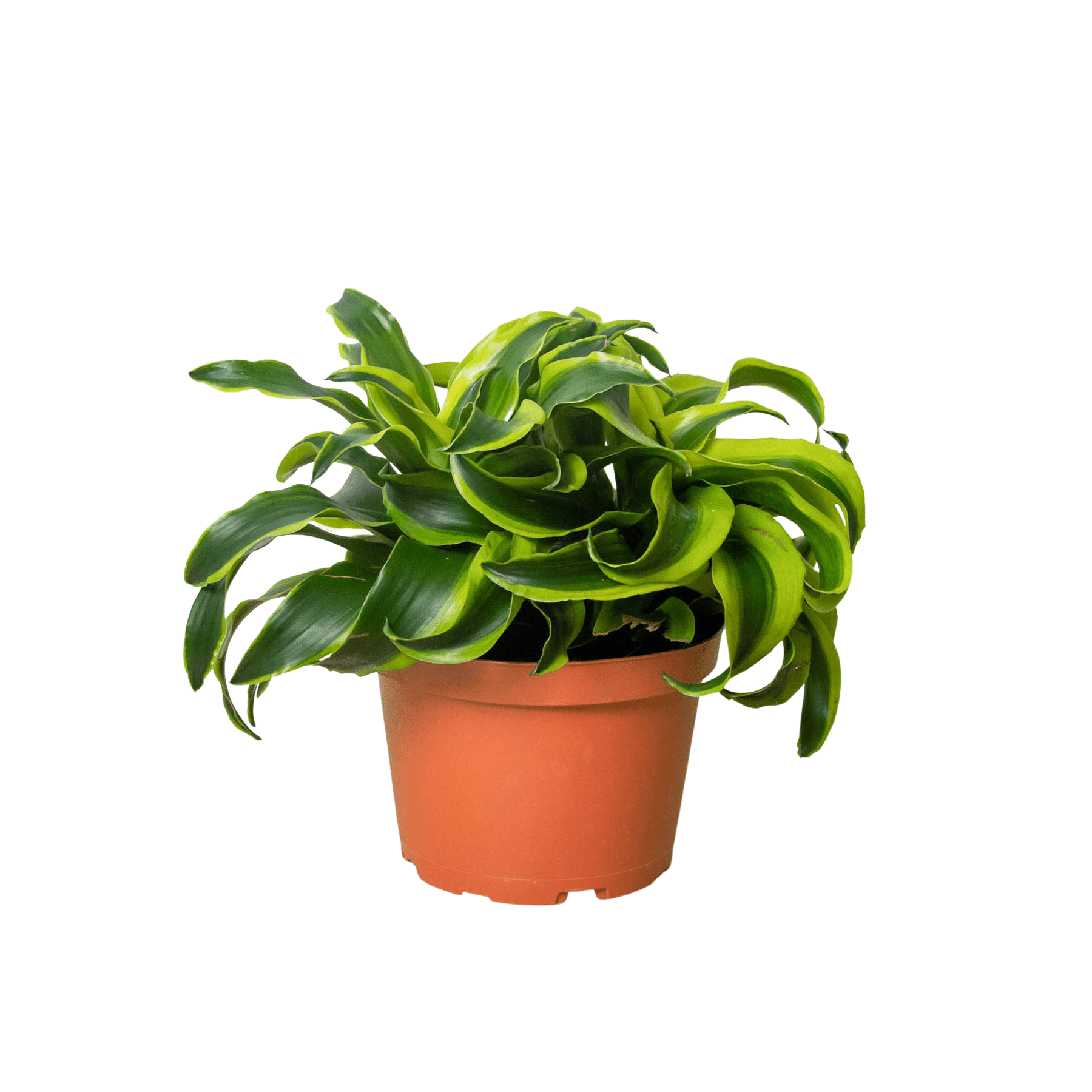
dracaena tornado dragon Dracaena ‘Tornado’ — 4" & 6" Pot Options
SKU: 45190004154
dracaena tornado dragon

dracaena tornado dragon Dracaena ‘Tornado’ — 4" & 6" Pot Options

Sale price$23.18 Regular price$25.76
Save 10%

Shipping Estimate
USA
  • USA
  • CAN

Ships within 48 hours · Estimated delivery Jul 9 - Jul 14

Promo Codes Available:

For Your Every Summer RSVP, with Code: SUMMER15

Description

dracaena tornado dragon Dracaena ‘Tornado’ — 4" & 6" Pot OptionsCurated Indoor Plants Designed to Pair Beautifully with H Potter Dracaena Tornado curated by H Potterdark green spiral leaves with bright variegated edges, easy indoor care, and sculptural style for indoors. A modern statement plant with movement and texture, Dracaena Tornado features dark green leaves that twist in a spiral formation from a slender stem. Each leaf is finished with bright greenish yellow variegation along the edgesan elevated look

Curated Indoor Plants — Designed to Pair Beautifully with H Potter

Dracaena ‘Tornado’ curated by H Potter—dark green spiral leaves with bright variegated edges, easy indoor care, and sculptural style for indoors.

A modern statement plant with movement and texture, Dracaena ‘Tornado’ features dark green leaves that twist in a spiral formation from a slender stem. Each leaf is finished with bright greenish-yellow variegation along the edges—an elevated look that adds depth to entryways, offices, living rooms, and bright hallways.

What to expect: Your plant arrives healthy with natural variation in leaf pattern, size, and overall shape—each Dracaena is unique.
Why trust H Potter: For nearly 30 years, we’ve built outdoor and indoor pieces meant to live in real conditions. As we expand into plants, we’re applying the same standard—practical care guidance, protective packing, and styling that feels finished.
At a Glance

Plant Details

  • Botanical name: Dracaena fragrans
  • Common name: Dracaena ‘Tornado’
  • Nursery pot size options: 4" or 6" nursery pots
  • Approx. height at shipping: ~10"–22" (varies by pot size and growth stage)
  • Foliage: Dark green spiral leaves with greenish-yellow variegation at the edges
Quick ID tip: That spiral leaf twist is the signature “Tornado” look—architectural and clean, with natural variation plant to plant.

Care at a Glance

  • Light: Medium to bright, indirect light
  • Water: Let the top 1–2" of soil dry, then water; avoid soggy soil
  • Humidity: Average indoor humidity
  • Temp: Typical indoor temps; avoid cold drafts and heat vents
  • Difficulty: Easy / low-maintenance
Most common issue: Too much water. Dracaena prefer to dry slightly between waterings.
Why You’ll Love It
  • Sculptural, modern form: Spiral leaves add movement without needing flowers.
  • Easy care rhythm: A forgiving plant for busy homes and offices.
  • Variegated edge detail: Bright trim gives a finished, designed look.
  • Great for styling: Looks striking in clean planters, consoles, and corners that need height.
Care Guide

Light Medium to bright, indirect light

Place in a bright room away from harsh direct sun. Medium light works well too; brighter indirect light helps keep growth stronger and variegation crisp.

Water Let the soil dry slightly between waterings

Allow the top 1–2 inches of soil to dry, then water thoroughly and let excess drain. Avoid letting the pot sit in standing water.

How to know it’s time: The pot feels lighter and the soil is dry at the top. If it’s still damp, wait another day or two.

Humidity Comfortable indoor humidity

Average indoor humidity is typically fine. If your home is very dry, occasional gentle misting or a nearby humidity tray can help leaf edges stay fresh.

Temperature Keep away from drafts

Typical indoor temperatures are ideal. Avoid cold windows in winter, exterior doors, and direct heat vents.

Beginner success rule: Slightly dry is better than constantly wet. Dracaena are happiest with breathable soil and a steady routine.
48-Hour Arrival & Unboxing

Live plants may look a little travel-worn after shipping. A quick reset helps your Dracaena settle in beautifully.

When What to Do Why It Helps
Immediately Unbox promptly and remove packing materials. Prevents pressure marks and lets the plant breathe.
First 2–6 hours Place in medium/bright indirect light. Reduces stress during acclimation.
First 24 hours Check soil moisture; wait if it’s still moist. Avoids overwatering after transit.
Within 48 hours Water only if the top soil is dry; drain fully. Supports recovery and strong roots.
What’s normal after shipping: Slight leaf curl, minor edge marks, or soil settling. Most plants perk up quickly in stable light and careful watering.
Designed to Pair with H Potter
Shipping & Live Plant Handling

Live plants are packed with care and ship on a schedule designed to protect plant health in transit.

Our Packing & Shipping Process
STEP 1

We use wood fiber to cover soil to help prevent spillage.

STEP 2

Wood fiber is placed under the foliage.

STEP 3

We cover the planter and soil area with a protective plastic sleeve.

STEP 4

We secure it tightly with a zip-tie.

STEP 5

We place the plant in a paper bag and secure it.

STEP 6

The paper bag provides a clean presentation and added protection.


  • Shipping regions: Lower 48 United States
  • Weather considerations: We may delay shipping in extreme cold to protect plant health
  • Tracking: Tracking details are provided once your order ships
  • Live arrival policy: If a plant does not have a safe arrival, please text images to 208-640-4206 along with your name and order number

Add sculptural green to your space—without the fuss.

Choose a refined pot size, give it bright indirect light, and water when it’s ready. Dracaena ‘Tornado’ does the rest.

Shop Indoor Planters Explore Terrariums

FAQs

Is Dracaena ‘Tornado’ easy to care for?

Yes. It’s a low-maintenance indoor plant that prefers medium to bright indirect light and drying slightly between waterings.

How often should I water it?

Water when the top 1–2 inches of soil are dry. The exact timing depends on your home’s light and temperature.

Does it do well in lower light?

It can tolerate medium light, but brighter indirect light encourages stronger growth and keeps the variegation looking its best.

Will my plant look exactly like the photos?

Live plants vary naturally. Leaf twist, size, and variegation can differ slightly—each plant is unique.

Do you offer multiple pot sizes?

Yes. This plant may be available in a 4" or 6" nursery pot depending on current inventory.

Is Dracaena safe around pets?

If you have pets or small children, we recommend placing plants out of reach. For pet-specific guidance, consult a veterinary resource for your household.

Shipping Notes
  • Free Standard Shipping on $100+ Orders to the USA.
  • Except Preorder products are shipped in 48 hours.
  • Delivery to the USA:
  1. Standard Shipping : 3-10 business days
  • If time is of the essence, please consider selecting expedited delivery for faster service.
Exchange/Return Notes
  • We offer a 30-day return/exchange service after receiving.
  • Final sale items are not eligible for returns or exchanges.
  • To process your return/exchange, please contact us at [email protected]
  • Please click here for more details>>> Return & Exchange Policy
SKU: 45190004154

Discover Niche Categories That Outsell dracaena tornado dragon

Top-Converting Item to Boost Your Average Order

4.6 ★★★★★
Based on 1971 reviews
Sort
Highest Rating
Newest First
Oldest First
Product Reviews
C
Verified Purchase
Chris Hardwick
Port Orchard, US
★★★★★ 5
Works flawlessly for drafting use...
Color: Black, Style: Wireless, Pattern Name: Mouse
This mouse has been a great upgrade for my setup. The wireless connection is fast and reliable, and I honestly can’t tell the difference from a wired mouse. The sensor is very responsive, and everything feels smooth and precise, especially combined with the Logitech G mouse pad. I actually use this all day at work for drafting, so precision and comfort really matter, and this mouse delivers on both. I’ve even purchased several more for my drafting team, and everyone has been really happy with it. I also like the customizable weight system—you can adjust it to feel just right in your hand. Overall it feels solid, well made, and comfortable for long hours of use.
WAS THIS REVIEW HELPFUL?YesReportShare
Reviewed in the United States on March 17, 2026
D
Verified Purchase
DANIEL A LIZARRAGA V
Louisville, US
★★★★★ 5
This is the last mouse you will ever buy
Color: Black, Style: Wireless, Pattern Name: Mouse
Just buy it. What can be said about this mouse that hasn't been said before? This is the perfect mouse, there is no contest. I know it is a bit on the pricier side, but if you need a mouse, just get the cheapest one you can get and start saving to get this one, IT'S THAT GOOD. The mouse glides over any decent mouse pad, you don't need to get a Logitech one. The shape is perfect for all kinds of grips and the weight system is great for customization. The led has different brightness levels, including turning it off completely to save more battery, and the keys are just silent and satisfying to press. Again, this is the best mouse ever, no other mouse will offer a better value for your money than this one. A bit steep, yes, but worth it.
WAS THIS REVIEW HELPFUL?YesReportShare
Reviewed in the United States on March 20, 2026
A
Verified Purchase
Aaron Grinnell
West Palm Beach, US
★★★★★ 5
One of the best mice I've ever owned
Color: Black, Style: Wireless, Pattern Name: Mouse
I was a little skeptical about this mouse but after 3 weeks of use it's continued to be my favorite mouse. Not only does it. Have a good feel. It is very durable and customizing. The weight is fantastic. If you get the charging pad it just glides. But is definitely worth its money
WAS THIS REVIEW HELPFUL?YesReportShare
Reviewed in the United States on April 19, 2026
W
Verified Purchase
William Garber
Lowell, US
★★★★★ 5
Impressive and Comfortable
Color: Black, Style: Wireless, Pattern Name: Mouse
Only after a couple play sessions in BF6 with this mouse, I can already feel how much more precise I can be with it. My first play session was a bit rough getting used to the feel of it. It’s quickly getting more natural. I switched from a ghost keyboards m1 mouse to this. The left and right mouse clicks feel a bit more stiff than my m1 mouse which I like. Easier to avoid accidental inputs. All the other buttons feel solid with clean clicks. The mouse wheel is a very different feel with more significant bumps while scrolling, but it adds a more tactile feel being easier to control. It also has a release that lets it just spin for probably more work type use rather than gaming. It’s easy to setup, basically plug and play but a bit confusing. It comes with of course, a charging cable but the Bluetooth usb comes in some sort of housing that plugs in by the charging cable. Not sure if that is better or worse than how I have it now which is the usb receiver plugged into the back of my pc. Works fine. Looking at the Logitech website shows up to 48 hours of battery life with default lighting, or up to 60 hours with no lighting. Fully charged it showed 26 hours (25 hours now at 96%). And turning off the lighting at 96% only goes up to 28 hours. Which is plenty as I usually plug my wireless device in to charge after use. My favorite part of this mouse is how comfortable it is. It’s a bit thicker filling in my smaller hands more compared to my m1 mouse. Another nice added comfort feature is the thumb ledge. It keeps my thumb off my mouse pad, and helps with control of the mouse in high stress fps situations. The weight also help in precise aiming. My m1 mouse was 65g , the g502 is 111g plus the 1 big weight and 2 smaller weights I added making it go up to maybe 119g. Highly recommend this mouse, and will try to update if it fails prematurely.
WAS THIS REVIEW HELPFUL?YesReportShare
Reviewed in the United States on November 22, 2025
D
Verified Purchase
DeeDee Bromlow
Boise, US
★★★★★ 5
It's just a Proteus Core, but wireless. Wait... it's a PROTEUS CORE, but WIRELESS!!!
Color: Black, Style: Wireless, Pattern Name: Mouse
I've been using a Logitech G502 Proteus Core for a couple of years, and I've been wanting a wireless mouse for ages however, I had been hesitant to switch to anything else because I loved that G502 Proteus Core. Then, this mouse came out. I knew it was time to upgrade. I get a mouse that looks, feels and performs identically to my Proteus Core. No, scratch that, BETTER than my Proteus Core. Except now no more wire wrangling. No more wire catching on the edge of a table or needing to tape it down. Except the sensor is faster and better than my G502PC, and the wireless mouse is somehow LIGHTER than the wired version. What kind of space age magic is this!? When I got it at first, I was actually a little disappointed. I had been excited for this new, fancy mouse that was going to step my game up. But then I got it and it just felt exactly like my old one. It felt like nothing has changed. The wait to use it came to a somewhat anticlimactic end. But then I thought about it and realized..... IT FEELS EXACTLY LIKE MY OLD ONE. I got literally exactly what I loved before, but this time with RGB lighting and no cord! What had I expected? I got literally exactly what I wanted, and it felt like home. And the battery life, of my goodness, the battery life. I've been using this mouse since mid Early/mid-May. I probably use my mouse for about 1 to 4 hours a day, sometimes every other day depending on schedule. I charged this mouse to 100% on my first day of ownership. I haven't charged it since, and my battery currently reads 64%. Incredible. Over a month of regular and consistent use, with lighting on (at about 60-75% brightness, purple) and I haven't even gotten it to half charge. That tells me I've probably got another month or so of battery life to go! I have been BEYOND satisfied with this mouse. I only had one minor hiccup. Initially I put the wireless receiver in the rear of the tower, straight into the motherboard's primary USB 3 port. Unfortunately, I noticed that I would get occasional stuttering and hitching with the mouse cursor. After a bit I noticed that it only happened when my cell phone was on my computer desk in front of my mousepad. I relocated the receiver to the USB3 slot on my Corsair K60 keyboard, problem solved. I haven't had one stutter or hitch since. I think my cell phone's WiFi signal was causing some form of interference. I could reproduce the problem with my cell phone location every time, so I'm confident in what the issue was. BEYOND satisfied with this product. If you have ever used any of the Logitech G502 line - or mice of a similar shape - this product is an absolute NO BRAINER purchase.
WAS THIS REVIEW HELPFUL?YesReportShare
Reviewed in the United States on June 13, 2020

recommand products