Pay in installments of $6.99 with
 ,
,
 and
and

Shipping Estimate
USA
- USA
- CAN
- USA
- CAN
Ships within 48 hours · Estimated delivery Aug 3 - Aug 8
 Promo Codes Available:
For Your Every Summer RSVP, with Code: SUMMER15
Description
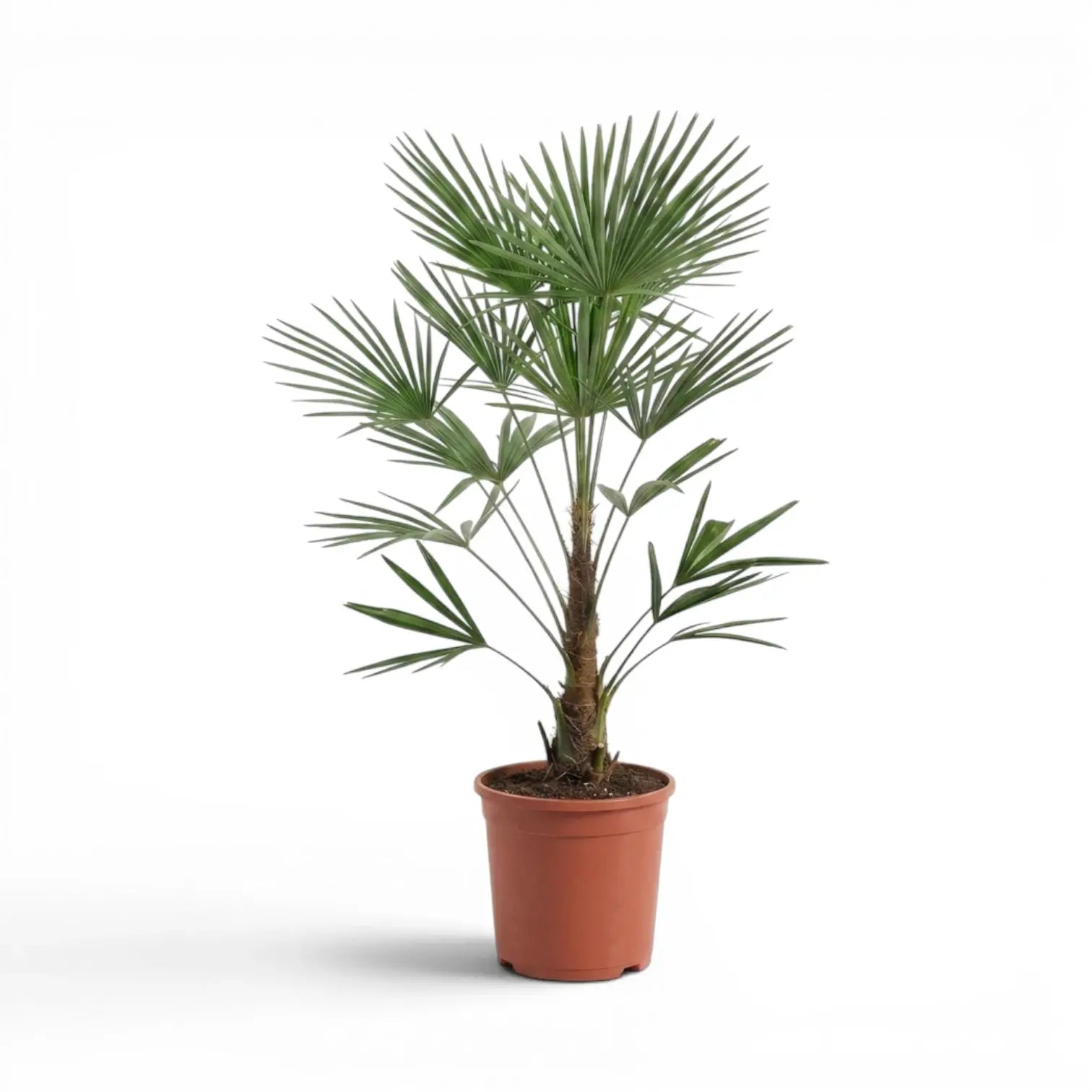
mystery palm plant Trachycarpus fortunei FrostyTrachycarpus fortunei 'Frosty' Trachycarpus fortunei 'Frosty' is a hardy outdoor windmill palm selection with pleated green to blue green fan leaves and a cooler, lighter look than many standard green forms. It keeps the same solitary trunk, fibrous stem covering and rounded fan leaf crown that make Trachycarpus fortunei one of the most familiar palms for temperate outdoor planting. This selection is grown from seed taken from selected mother plants
Trachycarpus fortunei 'Frosty'
Trachycarpus fortunei 'Frosty' is a hardy outdoor windmill palm selection with pleated green to blue-green fan leaves and a cooler, lighter look than many standard green forms. It keeps the same solitary trunk, fibrous stem covering and rounded fan-leaf crown that make Trachycarpus fortunei one of the most familiar palms for temperate outdoor planting.
This selection is grown from seed taken from selected mother plants and raised under Northern European nursery conditions. Its main difference is the cooler leaf tone; care still follows the species, with open light, drainage, wind shelter, steady establishment and sensible root protection during hard frost.
- Leaf colour: Green to blue-green fan leaves with a light, cool haze.
- Growth habit: Solitary trunk-forming palm with a terminal crown of divided fan leaves.
- Trunk texture: Older stems develop the coarse brown fibre typical of Chinese windmill palms.
- Growth rate: Slow to steady, especially in containers and during the first years after planting.
- Supplied size: Approx. 120 cm tall in a 32 cm nursery pot.
Trachycarpus fortunei 'Frosty' in outdoor planting
Trachycarpus fortunei 'Frosty' is best used as an outdoor palm for sheltered gardens, courtyards, terraces and large containers. The crown becomes wider as the plant matures, so it needs enough space around the leaves rather than a tight, windy corner where the fans are repeatedly torn.
As a seed-grown selection, individual plants can vary slightly in crown density, leaf stiffness and the strength of the blue-green tone. In favourable garden conditions, mature Trachycarpus fortunei can eventually reach several metres tall, while container plants stay smaller and develop more slowly.
Planting and soil for Trachycarpus fortunei 'Frosty'
Plant in spring or early summer so the roots can establish before winter. Choose full sun to light shade and a position with good drainage. A wall, courtyard, terrace edge or sheltered border is better than a fully exposed site because strong drying wind can split fan leaves and increase winter stress.
- Light: Full sun to light shade, with some shelter for newly placed or young plants.
- Soil: Fertile, well-drained soil with mineral structure so winter water can move away from the roots.
- Watering: Keep evenly moist while establishing, then water deeply during dry spells.
- Containers: Use a deep, heavy pot with drainage holes and an open palm-suitable substrate.
- Repotting: Move up gradually when the root ball fills the pot or watering becomes difficult.
Winter care for Trachycarpus fortunei 'Frosty'
Established plants in the ground tolerate cold better than potted palms because the surrounding soil buffers the roots. A well-rooted plant in open ground can tolerate much lower temperatures than the same palm in a container, but wet soil, freezing wind, a small root ball and recent planting all reduce practical hardiness.
Use around -7 °C as the practical protection point for potted plants. Established plants rooted into deep, well-drained soil can tolerate much lower temperatures than container-grown palms, but wet soil, freezing wind and recent planting reduce practical hardiness. Protect the pot and root zone first, remove fleece during milder weather, and avoid keeping the crown wrapped while damp.
Common issues with Trachycarpus fortunei 'Frosty'
Brown tips usually come from drying wind, irregular watering, root stress or salt build-up in container substrate. Torn leaf segments are common on exposed palms and mainly affect appearance. Yellowing can point to cold wet roots, depleted substrate, nutrient shortage or a pot that has become too small.
The main long-term risk is poor drainage, especially in winter. Cold wet soil around the roots can weaken the palm even when the upper growth looks hardy. Scale insects and aphids may appear on sheltered or overwintered container plants, so check the leaf bases and undersides regularly.
Flowers, fruit and safety
Older plants may produce branched yellowish flower clusters in suitable outdoor conditions. Trachycarpus fortunei is dioecious, so male and female flowers are carried on separate plants. Dark blue fruit can develop on female plants when pollination has taken place.
Trachycarpus fortunei is considered non-toxic to cats and dogs. The stiff leaf segments and rough trunk fibre can still scratch skin during pruning or moving, so gloves are useful when handling older fronds or shifting larger potted plants.
Trachycarpus fortunei 'Frosty' name and botanical background
Trachycarpus fortunei belongs to the palm family, Arecaceae. The species is native from south-central China to northern Myanmar and grows primarily in temperate habitats. The genus name Trachycarpus comes from Greek roots meaning rough fruit, while the species epithet fortunei honours the Scottish plant collector Robert Fortune. The name 'Frosty' refers to the selected plant’s cool-toned foliage.
Trachycarpus fortunei 'Frosty' is a strong choice for sheltered outdoor planting where a hardy fan palm with a cooler leaf tone, evergreen crown and fibrous trunk can develop over time.
Shipping Notes
- Free Standard Shipping on $100+ Orders to the USA.
- Except Preorder products are shipped in 48 hours.
- Delivery to the USA:
- Standard Shipping : 3-10 business days
- If time is of the essence, please consider selecting expedited delivery for faster service.
Exchange/Return Notes
- We offer a 30-day return/exchange service after receiving.
- Final sale items are not eligible for returns or exchanges.
- To process your return/exchange, please contact us at [email protected]
- Please click here for more details>>> Return & Exchange Policy