SKU: 6076779715
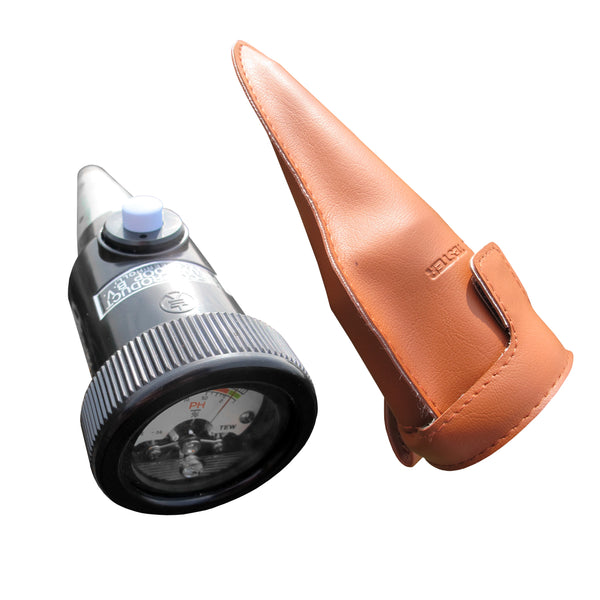
kelway soil acidity and moisture meter

kelway soil acidity and moisture meter Soil pH Meter

Sale price$22.16 Regular price$24.62
Save 10%

Pay in installments of $6.16 with ShopPay, AfterPay and Klarna

Shipping Estimate
USA
  • USA
  • CAN

Ships within 48 hours · Estimated delivery Jul 24 - Jul 29

Promo Codes Available:

For Your Every Summer RSVP, with Code: SUMMER15

Description

kelway soil acidity and moisture meter Soil pH MeterSoil pH Meter with Inbuilt Moisture Sensor Compact and easy to use for quick assessment, with carrying case. pH testing only takes a few seconds to check a point in the soil and it can greatly increase the health and development of the grass and plants if you act on the readings of the pH meter. In extreme cases save plants and grass from certain death by alerting you at early stages before problems start to occur. Scale Accuracy Size weight pH 31 2 8

Soil pH Meter with Inbuilt Moisture Sensor

Compact and easy to use for quick assessment, with carrying case.

pH testing only takes a few seconds to check a point in the soil and it can greatly increase the health and development of the grass and plants if you act on the readings of the pH meter. In extreme cases save plants and grass from certain death by alerting you at early stages before problems start to occur.


Scale Accuracy Size/weight
pH 31/2 - 8/moisture 0-100% 10% 160 x 50 mm/170 g

Purpose of the pH-meter

To make the soil suitable for the absorption of fertiliser, acidic soil must be neutralised with lime or a lime-based fertiliser. However, if too much lime or lime fertiliser is used, the result will be a manganese deficiency causing complete infertility of the soil. Therefore, if a lime treatment of the soil is required, it is recommended first to determine the degree of acidity, i.e. the pH of the soil to have a basis on which to decide how much lime must be added. This can be simply done with the pH-meter which has already been successfully used by many market gardened. A perfectly neutral soil has a pH = 7; the instrument should always indicate this value before taking any readings.


How to Use the pH-meter

  1. Take the instrument out of its case and check that the needle indicates pH 7. If this is not the case it can be very simple adjusted. Remove the cover and glass window from the instrument and carefully turn the adjusting screw clockwise or counter-clockwise, as the case may be.
  2. The electrode is very vulnerable and should carefully cleaned with water and dried with a clean cloth before and after use. This is very important since otherwise the reading is not correct. After cleaning, the electrodes should not get in contact with anything, not even with your hands since these always give off some transpiration, however slight, and this would adversely affect the readings.
  3. Fill the soil holder with the soil under test and pack the soil so as to be sure that the complete electrode surface will be in contact with it. Insert the instrument into the soil until the silver-coloured electrodes are completely covered with soil. Then turn the instrument two or three times about its longitudinal axis to ensure good contact between soil and electrodes. Black earth, clay, loam etc. should have a moisture content (shown on the meter) between 50 and 70%. If the soil is too wet, the water should be pressed out until the moisture content is at a minimum 50%. Humus-rich soil may have higher moisture content, even exceeding 100% as is often the case. If the soil is too dry, the pH cannot be measured; in that case it should first be moistened with distilled water; readings can then be taken after about. 2 hours.
  4. To measure the moisture content in the soil, press the white button; the moisture content can be read off immediately. After use, clean the electrodes thoroughly with water and wipe off with a dry cloth. Normal soil used for cultivation will seldom have a moisture content below 30%, as is the case e.g. with dry sand.
  5. It takes the needle about three minutes to get stabilised. Next the pH can be read off. DO NOT allow the meter to stay in the soil for more than 5 minutes. This will prevent undue corrosion of the electrodes.

Benefits of the pH-meter

  • Since the instrument generates its own current when in contact with the soil, no chemicals, distilled water and/or external source of current, such as a battery, are required.
  • Measuring is extremely simple: just insert the electrode into the soil and the pH can be read off a few minutes later (clean instrument with water before and after use).
  • The instrument is compact, of attractive design and easy to carry along.
Shipping Notes
  • Free Standard Shipping on $100+ Orders to the USA.
  • Except Preorder products are shipped in 48 hours.
  • Delivery to the USA:
  1. Standard Shipping : 3-10 business days
  • If time is of the essence, please consider selecting expedited delivery for faster service.
Exchange/Return Notes
  • We offer a 30-day return/exchange service after receiving.
  • Final sale items are not eligible for returns or exchanges.
  • To process your return/exchange, please contact us at [email protected]
  • Please click here for more details>>> Return & Exchange Policy
SKU: 6076779715

Discover Niche Categories That Outsell kelway soil acidity and moisture meter

Top-Converting Item to Boost Your Average Order

4.3 ★★★★★
Based on 12 reviews
Sort
Highest Rating
Newest First
Oldest First
Product Reviews
R
ReViewER
Grantham, US
★★★★★ 5
Sorry, Brother. Epson smashed you.
I have been a long time Epson user. I have owned their printers, all-in-ones, movie projectors, and even a receipt scanner. In all cases, I have always found them to be the best performance per dollar of any of the big guys. There kind of like Panasonic in cameras where people may talk about some other big names, but what you get per dollar is always good from them. Somewhere along the way, I got disillusioned with companies charging me $60 per pack of ink. I'd get really mad when I couldn't print black text because red or something was out. For a few years, I gave up and just went black and white laser printer. The toner was dirt cheap, and my printing cost dropped to virtually nothing. But, my ability to pront pictures was gone. No more color at all. I'd have to go to a print business if I needed color copies. Well, this finally changed that. The EcoTank is a great design. The "Eco" stands for the economic cheap ink it takes, and the "Tank" refers to the big holding tanks for the ink and give long ink life. Epson probably makes the best ink, but many manufacturers sell inks for this printer. There's none of the stupid compatability issues with cartridges. It's 2026, so of course it all connects wirelessly over WiFi. It's wonderful. The only issue is that you might have to do a little more maintenance to keep it reliable. If you let old ink carts sit too long, you could just replace them. Here that isn't an option. I've seen Youtube recommendations that say you should probably print a color page every week or two, so factor that in to keep it running well. I love it. Five stars.
WAS THIS REVIEW HELPFUL?YesReportShare
Reviewed in the United States on June 8, 2026
J
JoyinFL
Pawtucket, US
★★★★★ 5
Solid Printer for Regular Use
I ordered this Epson EcoTank ET-2903 because I wanted a printer that did not make me feel held hostage by tiny ink cartridges. The refillable tank system is the main reason this printer stands out. Being able to see the ink levels on the front and refill from bottles makes the whole process feel less wasteful and less stressful. Setup was straightforward. Filling the ink tanks was easier than I expected because the bottles are keyed to the right color, so you are not guessing where each one goes. I did not have a mess during setup, and that was my biggest concern with a tank printer. Print quality is strong for normal home and office use. Black text comes out clean and easy to read, and color prints are bright enough for school projects, labels, recipes, forms, and casual photo printing. It is not the fastest printer I have ever used, but the tradeoff is lower ink stress and better long-term value. The wireless printing is convenient once it is connected. I like being able to print from my phone or laptop without moving files around. The scanner and copier are also useful for everyday paperwork, receipts, and documents. A couple practical notes: this is a rear-feed paper tray style printer, so plan where you are putting it because it needs some clearance. Also, it does not automatically print double-sided, so duplex printing takes a manual flip. For value, the ink tank system is what makes this worth it. If you print regularly and are tired of buying cartridges, this is a smart home office upgrade.
WAS THIS REVIEW HELPFUL?YesReportShare
Reviewed in the United States on June 12, 2026
P
Pathune
Lowell, US
★★★★★ 5
Epson EcoTank ET-2903
Epson ecotank are great replacements for standard printers. The fact that you get to use the ink bottles rather than the rip off ink cartridges that only last a little while is an amazing benefit. They print well and have a good print quality, so much so that we have one for normal printing and one for sublimation printing. I do all my printing wireless and have the rate occurrence that it has connectivity issues, like all printers. It holds a good amount of paper making refills less often Than the cheaper printers. To me it has been perfect for my small home business.
WAS THIS REVIEW HELPFUL?YesReportShare
Reviewed in the United States on June 12, 2026
D
DJorRia
Los Angeles, US
★★★★★ 5
Goodbye Ink Cartridges
I’ve used cartridge printers for years, and the EcoTank system is honestly the biggest selling point here. Filling the tanks was much easier than I expected thanks to the keyed bottles, and I didn’t make a mess during setup. Print quality is sharp for everyday documents, and color prints come out vibrant enough for school projects, photos, and crafts. The scanner works well, the wireless setup was straightforward, and being able to print directly from a phone is convenient. I also appreciate not having to constantly wonder if I’m about to run out of ink after a few dozen pages. The printer itself is fairly compact for an all-in-one unit and fits nicely on a desk. While it isn’t the fastest printer on the market, the long-term savings on ink and the hassle-free refill system make it a solid choice for a home office, students, or a family that prints regularly.
WAS THIS REVIEW HELPFUL?YesReportShare
Reviewed in the United States on June 7, 2026
L
Verified Purchase
Lyla Mae
Port Orchard, US
★★★★★ 5
WOW! This printer has been VERY impressive thus far *UPDATE*
Color: Black, Style: ET-2800-B, Pattern Name: Printer
My old printer broke (sooner than I would have liked) so I did A LOT of research before deciding to buy this Epson EcoTank printer for home office use. This is my honest review of it this far and I will definitely update my review if I run into any issues. So far, this printer has been pretty impressive (I've been using it for about a month). The price was pretty average for a printer... but I personally think all printers are overpriced so it was a bit more than I would have liked to spend. It is smaller and more lightweight than I was expecting which is a plus because it takes up less desk space than my previous HP printer. It is very easy to set up, comes with step-by-step easy instructions and guided instructions through the app. It only took me about 10 minutes (Mostly just waiting for the printer to initialize on its own). It is very easy and surprisingly satisfying to fill the ink tank. I like the idea that this ink might last longer than traditional cartridges and won't have as much plastic waste that went along with my old HP Inkjet. I have printed plain black and white documents as well as photos. I print all my photos at home, which is most of the printing that I do, so quality was important to me. The photos came out with pretty good quality! No ink smudges or off colors, colors are bright/vivid, and it is easy to modify what paper you're using with automatic prompts on the printer. Now for the negatives and the reason I'm giving this 4 stars... app to printer connection issues. This was a big issue with my old printer as well. I'm pretty tech savvy and I just have no idea why this is still always an issue for me. There is an extra Epson app that you are supposed to download for printing. Sometimes it can find my printer, sometimes it can't. Sometimes it gives me printer errors or won't let me print documents. And now every time I go to print something it says the paper being used doesn't match the paper settings so I have to bypass that error message (even though it does match in settings and the app, and this happens for both regular paper and photo paper). I've turned everything off and back on again, but the issues with consistent connection and error messages are still an issue. Usually with some fiddling around, I can get the documents/pictures to print but sometimes it feels like I'm jumping through unnecessary hoops. I'm still working out the kinks so if I find some magic solution I'll update my review. Considering this is an issue with most home printers I've used, it's not a deal breaker. All in all, if you are looking for a new home printer, I would definitely recommend this one. The quality has been great for me and I am pleased with my purchase (so far). Hope this helps! *UPDATE*: I have now printed HUNDREDS of photos, they are all excellent quality, and my ink tanks are still mostly full. This is WAY better than my HP printer as far as ink longevity. Changing my review to 5 stars just based on how long this ink lasts. User interface is still a tad annoying but so worth it regardless.
WAS THIS REVIEW HELPFUL?YesReportShare
Reviewed in the United States on May 10, 2024

recommand products