Shipping Estimate
USA
- USA
- CAN
- USA
- CAN
Ships within 48 hours · Estimated delivery Jul 9 - Jul 14
 Promo Codes Available:
For Your Every Summer RSVP, with Code: SUMMER15
Description
most potent san pedro cactus Bolivian Torch Cactus 'Trichocereus bridgesii'The Bolivian Torch cactus, botanically known as Trichocereus bridgesii, is a fast growing, columnar cactus prized for its tall, sculptural form and low maintenance care. Native to Bolivia, this striking species has become a favorite among cactus enthusiasts and indoor plant collectors alike for its clean lines, soft green to bluish tones, and impressive height potential. In 1974, Friedrich and Rowley merged the genus Echinopsis and reclassified it as
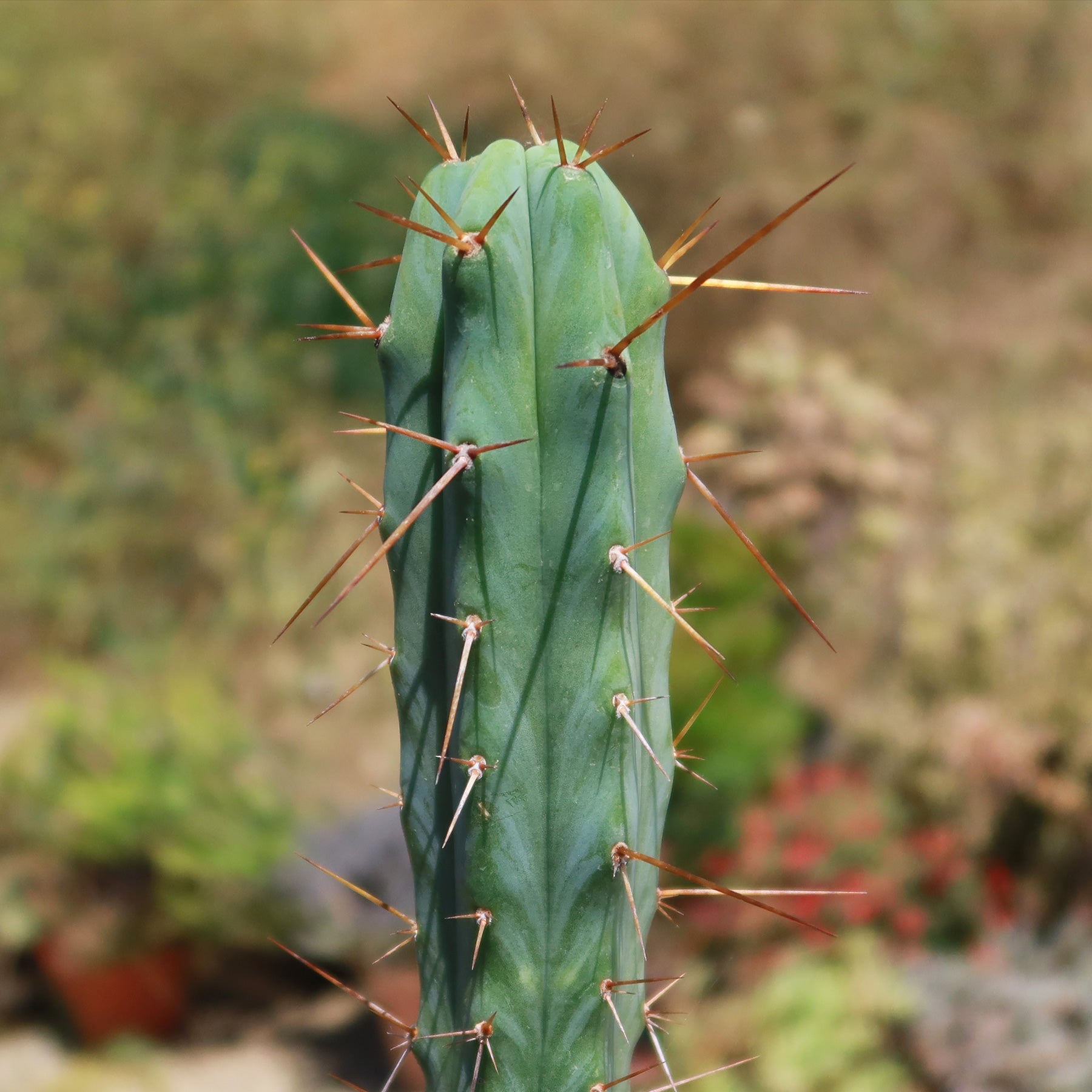
The Bolivian Torch cactus, botanically known as Trichocereus bridgesii, is a fast-growing, columnar cactus prized for its tall, sculptural form and low-maintenance care. Native to Bolivia, this striking species has become a favorite among cactus enthusiasts and indoor plant collectors alike for its clean lines, soft green-to-bluish tones, and impressive height potential.
In 1974, Friedrich and Rowley merged the genus Echinopsis and reclassified it as Echinopsis lageniformis, which also has the common name Achuma.
The Bolivian Torch stands out for its ribbed stems lined with small clusters of spines and its ability to grow much faster than many other cacti. Under the right conditions, it can reach heights of up to 16 feet, making it a bold statement plant in both indoor and outdoor settings.
When and How to Water Your Bolivian Torch Cactus
Your Bolivian Torch cactus prefers infrequent watering to mimic its natural desert environment. It thrives on the “soak and dry” method, so make sure that after watering the plant allow the soil to completely dry out before watering again.
The Trichocereus bridgesii should be watered every 10-14 days during the growing season, with minimal watering 3-4 weeks during the dormant season.
In the spring and summer, water deeply until excess water drains out of the bottom of the pot. Make sure the soil is completely dry before watering again, as overwatering can quickly lead to root rot. Always use well-draining soil and a pot with drainage holes to keep the roots healthy..
In the fall and winter, reduce watering significantly since the cactus slows its growth. Only water when the soil has been dry for an extended period. Overwatering can lead to root rot, which can cause fungal infections or other diseases. Watch for signs like slight wrinkling, which may indicate the plant needs water, but avoid watering too often to prevent damage
Light Requirements - Where to Place Your Bolivian Torch Cactus
When growing indoors, the Bolivian Torch cactus thrives in bright, indirect light. Place your cactus near a sunny window where it can receive plenty of natural light for at least 6-8 hours a day.
However, it's important to avoid exposing the plant to direct sunlight during the hottest part of the day, as this can cause the plant to become sunburned.
If your indoor space does not get enough light, you can use a grow light to support healthy growth and maintain its upright, columnar form.
When growing outdoors, choose a spot with plenty of sunlight. The Bolivian Torch cactus enjoys full sun to partial sun and grows best when it receives at least 6–8 hours of light daily.
Make sure the outdoor area has well draining soil to prevent water from sitting around the roots. If you are moving your cactus outdoors for the first time, gradually introduce it to direct sunlight to avoid shock or burning. If the sun becomes too harsh, especially in very hot climates, provide light shade during peak hours.
Optimal Soil & Fertilizer Needs
The Bolivian Torch cactus favors very airy, sandy soil that drains well. Planting them in ordinary soil will result in compacted roots, stunted growth, and most likely root rot. Instead, make or buy a well-draining potting mix, or ideally, use our specialized potting mixGo to soil cactus mix blend 1 gal 4 qt cacti succulent dirt compost growing media that contains over 5 natural substrates and mycorrhizae to promote the development of a strong root system that helps your torch cactus to thrive.
When it comes to fertilizing your torch cactus, a balanced, low-strength NPK fertilizer applied once per year during the actively growing season, which is typically spring, promotes steady growth. To encourage strong root development, use a diluted NPK fertilizer in an equal ratio of 5-10-5, with a slightly higher phosphorus content.
During the cooler months, reduce or stop fertilizing altogether, as the Bolivian Torch cactus enters a dormant phase. Feeding during this period can lead to weak or stretched growth and may stress the plant.
Hardiness Zones & More
The Bolivian cactus is generally considered hardy in USDA zones 8–11.
The mature plants can tolerate brief temperature drops to around freezing, 32°F, if kept completely dry, though they are not frost-hardy in the long term.
In the United States, it is most commonly grown as an indoor plant, but in frost-free regions such as Southern Florida and Hawaii, it can be successfully cultivated outdoors.
This cactus thrives in temperatures above 50°F for consistent, healthy growth. Extended exposure to frost or freezing conditions can damage or kill the plant.
In terms of humidity, this Bolivian Torch plant prefers low to moderate levels, similar to its native habitat. It adapts well to typical indoor conditions as long as there is good airflow, which helps prevent excess moisture buildup and reduces the risk of fungal issues.
How to Grow as a Houseplant
When growing your Bolivian Torch cactus indoors, this cactus thrives in moderate to warm temperatures, ideally between 65°F and 85°F, where it can grow steadily and stay healthy. Place it in a spot with intense light, ideally within 1 foot of a south facing window so it gets plenty of sun throughout the day.Water it thoroughly only when the soil has completely dried out, since overwatering can quickly lead to root rot, especially during winter.
It does best in low humidity levels around 30% to 50%, which makes it perfect for typical indoor conditions. Keep an eye on its appearance, if it turns yellow or develops brown spots, it may be getting too much direct sun, while a stretched or thin shape means it needs more light.
Wildlife - Bolivian Torch Cactus Flowers Attract the Following Friendly Pollinators
The Bolivian torch flowers can attract friendly pollinators such as bees, butterflies, hummingbirds, and other beneficial insects. These pollinators play a crucial role in the ecosystem by aiding in the reproduction of plants and ensuring biodiversity.
According to ASPCA, the trichocereus bridgesii is mildly toxic to humans or pets. It is wise to keep the plant out of reach of children and pets to avoid accidental contact or ingestion.
How to Propagate Your Cactus
It is easy to propagate your Bolivian cactus by stem cuttings. The best time to do this is during the growing season in spring or summer when the plant is actively growing. Choose a healthy, mature stem and use a clean, sharp knife to make a cut. Let the cutting dry and callous for 1-2 weeks.
Once the cut end has fully dried, place the cutting in a pot with well draining cactus soil. Wait about a week before lightly watering, then continue watering only when the soil is completely dry. Keep the cutting in a bright area with indirect light while it establishes roots.
Key Takeaways
- Bolivian torch cactus, or Achuma, also known as Trichocereus bridgesii, is a a stunning perennial, evergreen cactus offering year-round beauty and a unique appeal for collectors while staying low maintenance.
- It is a tall, sculptural plant with a clean, modern look that can grow up to 16 feet, making it a bold statement piece in any indoor or outdoor space.
- It produces large, white, trumpet shaped flowers that bloom at night, releasing a light fragrance and creating a rare, eye catching display during the warmer months.
- This plant can thrive in bright light and adapts well to indoor conditions, making it a perfect low maintenance statement plant for sunny spaces inside your home.
- It attracts friendly pollinators like bees, butterflies, and hummingbirds, helping support a healthier garden while bringing more life and movement to your outdoor space.
Final Thoughts
Overall, the bolivian torch cactus (trichocereus bridgesii) is a striking and easy to care for plant known for its tall, sculptural growth and unique presence. With its clean, columnar shape and soft green to bluish tones, it adds a bold yet modern touch to any indoor or outdoor space. To keep your Bolivian Torch cactus thriving, place it in bright light, use well draining soil, and follow a simple soak and dry watering routine, allowing the soil to fully dry between waterings. Avoid overwatering and protect it from extreme cold to maintain healthy growth and keep it looking its best over time.
Shipping Notes
- Free Standard Shipping on $100+ Orders to the USA.
- Except Preorder products are shipped in 48 hours.
- Delivery to the USA:
- Standard Shipping : 3-10 business days
- If time is of the essence, please consider selecting expedited delivery for faster service.
Exchange/Return Notes
- We offer a 30-day return/exchange service after receiving.
- Final sale items are not eligible for returns or exchanges.
- To process your return/exchange, please contact us at [email protected]
- Please click here for more details>>> Return & Exchange Policy