Pay in installments of $5.68 with
 ,
,
 and
and

Shipping Estimate
USA
- USA
- CAN
- USA
- CAN
Ships within 48 hours · Estimated delivery Aug 8 - Aug 13
 Promo Codes Available:
For Your Every Summer RSVP, with Code: SUMMER15
Description
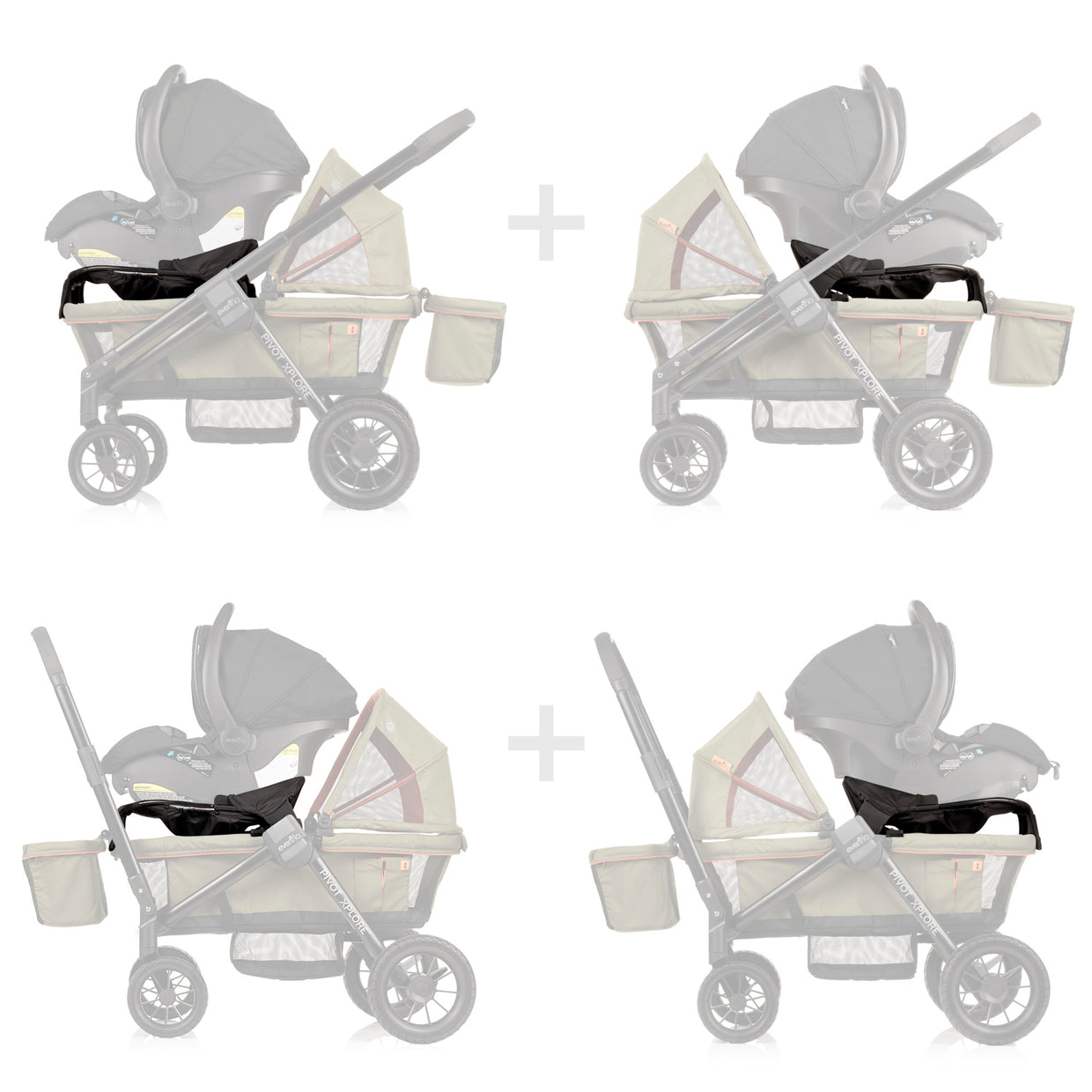
evenflo reversi car seat adapter Evenflo Pivot Xplore Stroller Wagon Infant Car Seat AdapterThe Evenflo Pivot Xplore Infant Car Seat Adapter makes the transition from car to the wagon quick and easy to get you rolling with two kids in tow. Simple in and out functionality without any tools to get you on your way. Just slide and click the adapter onto the Pivot Xplore frame and then place in your car seat with ease. Remove the adapter with a quick push button release. Whether your baby wants to face you or face the world, this modular Infant
The Evenflo® Pivot Xplore™ Infant Car Seat Adapter makes the transition from car to the wagon quick and easy to get you rolling with two kids in tow. Simple in-and-out functionality without any tools to get you on your way. Just slide and click the adapter onto the Pivot Xplore frame and then place in your car seat with ease. Remove the adapter with a quick push button release. Whether your baby wants to face you or face the world, this modular Infant Car Seat Adapter is reversible to be forward-facing or parent-facing. Whether you want to push or pull your Pivot Xplore, just flip the wagon’s handle without even removing the car seat. Elevated placement of the car seat with adapter still allows space for a second child rider to sit comfortably in the wagon along with all your child care necessities.For 100 years, Evenflo has been a trusted source of precision-manufactured, high-quality child-safety equipment engineered for real-life situations. Additionally, all Evenflo car seats and strollers include ParentLink customer-service perks, like real-time chat and free live video installation support.
Shipping Notes
- Free Standard Shipping on $100+ Orders to the USA.
- Except Preorder products are shipped in 48 hours.
- Delivery to the USA:
- Standard Shipping : 3-10 business days
- If time is of the essence, please consider selecting expedited delivery for faster service.
Exchange/Return Notes
- We offer a 30-day return/exchange service after receiving.
- Final sale items are not eligible for returns or exchanges.
- To process your return/exchange, please contact us at [email protected]
- Please click here for more details>>> Return & Exchange Policy
4.1 ★★★★★
Based on 17 reviews
Sort
Product Reviews
★★★★★ 5
A Beta Worth Rooting For
Format: Kindle
In Spare, Violet Fox flips the omegaverse on its head, giving us a Beta heroine determined to make her mark. Joining the Beta Trials to support her sick father, she's thrown into a pack that doesn't want her, especially the possessive Alphas.
But here's the twist: their sweet Omega turns out to be her scent match. Cue the angst, forbidden tension, and a slow-burn romance that will make your heart ache in the best way.
Violet Fox delivers an emotional, refreshing take on the genre, proving Betas aren't "spares." They're stars.
WAS THIS REVIEW HELPFUL?YesReportShare
Reviewed in the United States on January 10, 2025
★★★★★ 5
Beta, Alpha, Omega oh my!
Format: Kindle
Omegas are precious and given to Alphas & their packs... but the Betas want in too. To this end, the Beta government is rolling out its trial of assigning a Beta to each Alpha-Omega pack. But forcing a Beta into a pack where they are not wanted will not end well... Of course, no one expected the Omega to fall for the assigned Beta. Great read and cliffhanger
WAS THIS REVIEW HELPFUL?YesReportShare
Reviewed in the United States on February 15, 2025
★★★★★ 3
A familiar story, just with…..less.
Format: Kindle
So, as other reviewers make clear, this is very similar to Pack Darling and The Beta. It’s much closer aligned with The Beta, in plot and maybe more like Pack Darling with characters.
That being said, I don’t hate this…..but it wasn’t great either. It’s both books mentioned but just….less. Less angst, less emotion, less feeling. The plot feels very half fleshed out, and the “bad guy” feels underwhelming. I didn’t really feel any real emotions from and of the male leads, except maybe Oliver. The others fell sorta flat for me. And Mika makes herself out to be this big bad ass straight outta training and then we never see it from here again with the one fitting room incident as the exception.
SPOILER:
The whole, “Oh, I’m actually probably an Omega, but I don’t wanna be but I do actually wanna be but no one can ever know my secret that I do nothing to hide “ thing fell so flat. She never commutes to believing she was secretly an omega, but also mentions her “secret” a lot. It just felt so manufactured.
I’m intrigued enough to read part 2 and see how the author closes everything out, but this is not one I’ll recommend or ever come back to.
WAS THIS REVIEW HELPFUL?YesReportShare
Reviewed in the United States on February 13, 2024
★★★★★ 5
Wow.
Format: Kindle
Okay I’m usually not one for stand-alone’s I’m an avid series reader but my goodness am I so happy I read this! This story was brilliant & so absolutely mesmerizing. I loved reading about each character and their struggles as well as what helped them to move forward. The ending definitely brought tears to my eyes so hard. I truly wasn’t expecting some of what happened in this story. There is about to be a spoiler I am going to reveal so please stop reading if you don’t want the spoiler !!!! ⚠️ ⛔️ ‼️
I loved that the author didn’t do what most authors do with irredeemable male characters. I truly was hoping that Nate Jr. would be apart of the pack after the way he treated Astrea bc he truly didn’t deserve it. Though I must say you did a wonderful job or redeeming him as a person. I cried my eyes out when he walked into the story. I was truly terrified he was going to be a bad guy to the end. However you truly did him such a justice by having him realize his faults & having him redeem himself in the most wonderful way. I’m so sad that he didn’t get to hear how much his brother loved him & forgave him before dying. But again you wrote that ending so beautifully & I just can’t express how much I loved this story & how you took a different route than most authors I have read have. You are a remarkable author Cinder Blaze & I thank you generously for creating such a masterpiece.
WAS THIS REVIEW HELPFUL?YesReportShare
Reviewed in the United States on April 28, 2025
★★★★★ 4
Omegaverse
Format: Kindle
I was pleasantly surprised by this omega verse book. This 1 definitely had a few new twists And I really enjoyed reading it. The main female character was a badass and awesome. She had 1 best friend I wish we could have seen a little bit more of their friendship in this book. Her relationship with the male characters was good not to contrived or super instantaneous. And we had some fun plot twists that I didn't expect. I wish we had more of a follow up on the situation with her family her background and her mother who was a wench. I would definitely recommend this book.
WAS THIS REVIEW HELPFUL?YesReportShare
Reviewed in the United States on April 9, 2025