Pay in installments of $5.50 with
 ,
,
 and
and

Shipping Estimate
USA
- USA
- CAN
- USA
- CAN
Ships within 48 hours · Estimated delivery Aug 9 - Aug 14
 Promo Codes Available:
For Your Every Summer RSVP, with Code: SUMMER15
Description
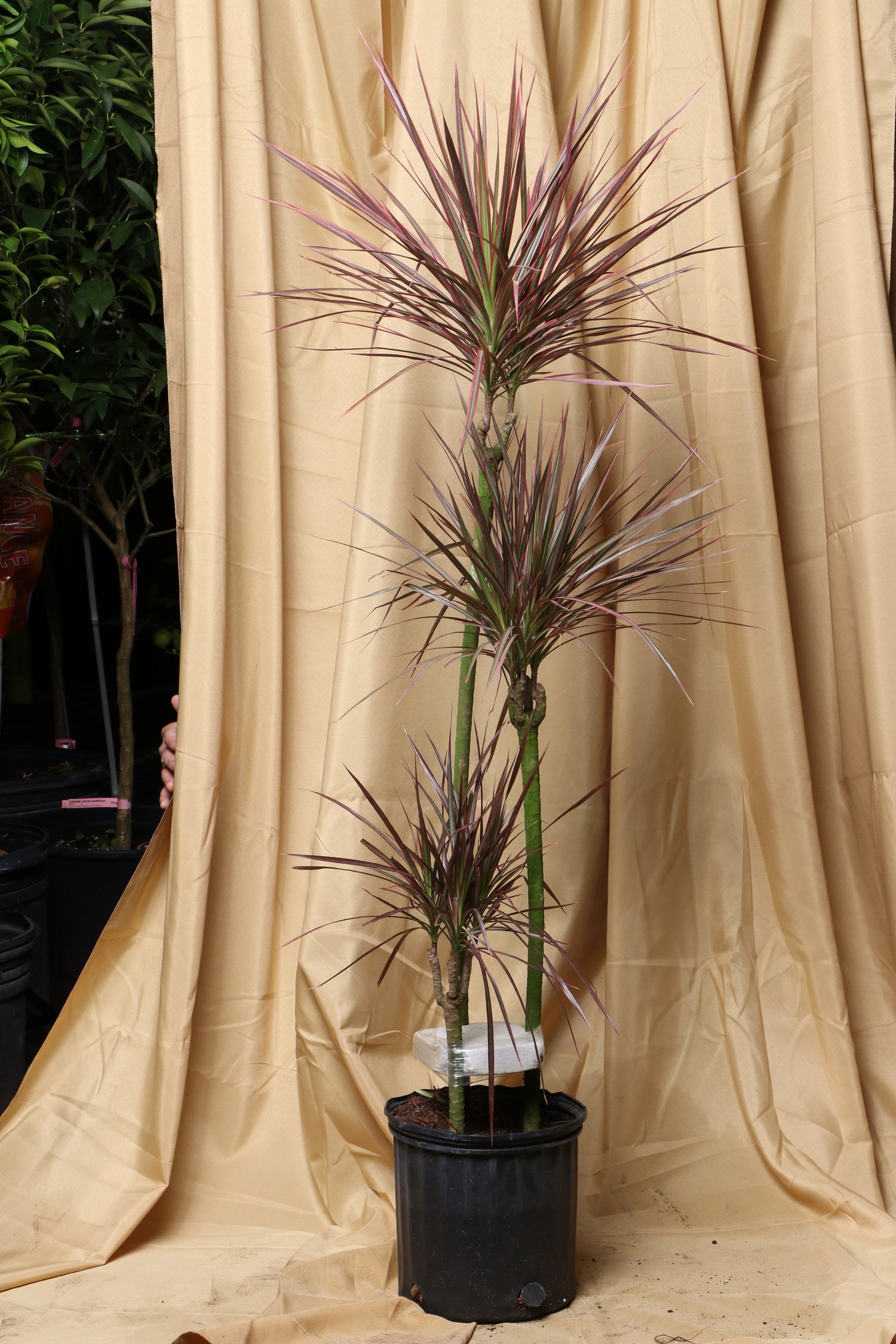
dracaena plants pictures Large Dracaena Marginata Red Dragon'Description You'll love the warmth that Dracaena Marginata 'Red Dragon' brings into your home. Those beautiful arching leaves with stunning red edges create the perfect pop of color, while growing at just the right pace, so you dont feel overwhelmed. Also known as the Madagascar Dragon Tree, the adaptable plant can handle your busy lifestyle beautifully. It handles irregular watering like a champ and adapts to various light conditions beautifully,
Description
You'll love the warmth that Dracaena Marginata 'Red Dragon' brings into your home. Those beautiful arching leaves with stunning red edges create the perfect pop of color, while growing at just the right pace, so you don’t feel overwhelmed.
Also known as the Madagascar Dragon Tree, the adaptable plant can handle your busy lifestyle beautifully. It handles irregular watering like a champ and adapts to various light conditions beautifully, developing into a statement-making tree that will impress any guests.
Care
Should a Dragon Tree be inside or outside?
Your Dracaena Marginata 'Red Dragon' is definitely an indoor plant at heart! It loves the controlled temperatures of your home over the unpredictable outdoor world. That said, it enjoys brief summer vacations outside when temperatures stay above 59°F (15°C).
Just keep it in a protected spot away from direct midday sun, and bring it back inside before temperatures drop. Think of it as your plant companion who occasionally enjoys a gentle outdoor adventure but always wants to come home to you!
How do you care for the Dracaena Marginata ‘Red Dragon’ indoors?
To give your red-edged Dracaena the best possible life indoors, place it in bright, indirect light where it can show off those gorgeous leaves. Water it when the top half feels dry, and it'll reward you beautifully.
Plant in well-draining soil with some peat moss mixed in - nothing fancy needed. It's comfortable with normal home humidity but appreciates the occasional mist, especially if your home runs dry. Keep temperatures between 65-75°F (18-24°C) and avoid cold drafts.
How often should I water my Dracaena Marginata ‘Red Dragon’?
Water your Dracaena Marginata every 2-3 weeks, letting the top half of soil dry completely between waterings. During spring and summer growing season, it might appreciate slightly more frequent drinks, while winter definitely calls for extra patience.
How much light does a Dragon Tree need?
Your Dracaena Marginata 'Red Dragon' thrives in bright, indirect light to really show off those stunning red edges. Think gentle, dappled sunshine or a few feet back from a bright window - the perfect lighting for admiring its beauty.
While it'll tolerate partial shade (it's accommodating like that), too little light means slower growth and less vibrant color in those signature red margins. East-facing windows are ideal, but it adapts to most lighting situations like the easygoing companion it is.
Where is the best place to put a Dracaena Marginata ‘Red Dragon’?
Your Dracaena Marginata 'Red Dragon' will be happiest in a spot with bright, indirect light - think east-facing windows or anywhere with gentle, filtered sunshine. It wants to showcase those beautiful red edges without getting harsh, damaging sunburn exposure.
Keep it away from direct harsh sun and cold drafts (it appreciates consistency just like we do!). Whether it's adding life to your living room or bringing natural beauty to your office, it'll thrive as long as it can avoid extreme temperature changes.
Can Dracaena Marginata ‘Red Dragon’ get too much sun?
Yes, your Dracaena Marginata 'Red Dragon' can definitely get too much sun! Those beautiful leaves will develop unsightly brown tips or fade significantly if exposed to harsh direct sunlight - relocate to a much gentler, safer spot right away.
Should you mist a Dragon Tree?
Misting your Dracaena Marginata 'Red Dragon' is like offering it a refreshing tropical treat. While not absolutely necessary with average home humidity, an occasional gentle mist helps it feel perfectly right at home in its own little Madagascar paradise.
Think of it as a gentle spa treatment rather than essential care - it appreciates the gesture in dry environments or during winter when heating systems dry out the air. For extra humidity benefits, group it with other plants or place on a pebble tray with water.
Can Dracaena Marginata ‘Red Dragon’ survive in low-light conditions?
Your Dracaena Marginata will absolutely survive in low-light conditions, maintaining its beautiful form even when the spotlight isn't directly on it. While it grows faster and develops more vibrant red edges in brighter spots, it'll still thrive in shadier corners.
Growth might slow down and colors may be slightly less intense, but it'll keep that striking architectural beauty that made you fall in love with it in the first place.
What is the best fertilizer for Dracaena Marginata Red Dragon?
Your Dracaena Marginata 'Red Dragon' thrives with a balanced, water-soluble fertilizer like 10-10-10 during spring and summer growing season. Always dilute to half strength and feed every two weeks to avoid overwhelming those beautiful roots with excess nutrients.
In autumn and winter, reduce feeding to once a month or stop altogether since growth naturally slows down. We love how forgiving this plant is - even if you forget to fertilize occasionally, it won't hold it against you!
How do I know which of the Dracaena types I have?
You can identify your Dracaena Marginata 'Red Dragon' by looking for those distinctive long, narrow leaves with gorgeous red or burgundy edges along the margins. The woody stem and sword-like leaf shape are classic Marginata characteristics that set it apart.
Other Dracaena varieties have different patterns - 'Colorama' shows pink, white, and green stripes, while 'Tricolor' displays green, yellow, and red bands. If your plant has solid green leaves with just those beautiful red edges, you've got the classic Red Dragon variety!
Do you water the Dracaena Marginata ‘Red Dragon’ from the top or the bottom?
Top watering works best for your Dracaena Marginata 'Red Dragon' because it helps flush out salt buildup that these plants are particularly sensitive to. Pour water slowly and steadily until it drains freely from the bottom drainage holes.
Always empty the saucer after watering to prevent those roots from sitting in standing water. If possible, use distilled or rainwater to avoid fluoride buildup, which can cause brown leaf tips. Your plant will thank you for this extra care!
Is Dracaena Marginata ‘Red Dragon’ high maintenance?
Your Dracaena Marginata 'Red Dragon' is wonderfully low-maintenance as well as forgiving, making it perfect for busy plant parents. It can handle irregular watering beautifully and it adapts to various light conditions with minimal fuss and care requirements.
We love recommending this plant to beginners because it's so resilient and understanding. It won't sulk if you forget to water it for a week or two, and it adapts to different lighting situations like the easygoing companion it is.
Pet-friendly?
The Dracaena Marginata 'Red Dragon' isn't safe for your furry family members. It contains compounds called saponins that are mildly to moderately toxic when eaten.
Is the Dracaena Marginata safe for dogs?
Unfortunately, your Dracaena Marginata 'Red Dragon' and your canine companion aren't the best match. If your curious dog decides to nibble those striking leaves, they might experience vomiting, diarrhea, drooling, or weakness - not the kind of excitement anyone wants.
Symptoms are usually mild unless your pup really goes to town on the plant, but it's best to keep this beauty out of reach. If you catch your dog sampling, it's worth calling the vet just to be safe. We recommend creating a safe boundary between your dog and this stunning plant.
Is the Dracaena Marginata poisonous to cats?
Your feline friend and this beautiful Dracaena Marginata 'Red Dragon' need some clear boundaries! If your cat becomes a plant nibbler, watch for vomiting, drooling, loss of appetite, dilated pupils, and lethargy— head to the vet.
Factoids
What are the different types of Dragon Tree?
The Dracaena Marginata family is like a wonderful plant collection, each member with their own special character! The 'Colorama' variety shows off with pink, white, and green striped leaves, while 'Magenta' displays green leaves with show-stopping magenta-red edges.
For something more substantial, 'Tarzan' brings wider, sturdier leaves to your space. The 'Tricolor' is particularly special, sporting green leaves with white and pink bands. Beyond the Dracaena Marginata varieties, you'll find cousins like the Canary Islands dragon tree - the extended family is just as wonderful.
How does the Dracaena Marginata ‘Red Dragon’ get its name?
The name comes from the Greek word 'drakaina' meaning 'female dragon,' while 'marginata' refers to those beautiful distinctive leaf margins. The 'Red Dragon' variety gets its name from those striking red edges and overall mythical, dragon-like appearance.
Historically, some Dracaena species produce a red resin called "dragon's blood" that was used for dyes and medicines. The combination of the exotic, almost mystical look and those fiery red leaf edges makes the dragon connection feel perfectly natural!
Does a Dracaena plant purify air?
Your Dracaena Marginata isn't just beautiful - it's working quietly behind the scenes as part of your clean-air team! NASA's Clean Air Study found these plants help remove indoor toxins like formaldehyde, benzene, and xylene from your air.
Don't expect miracle-level purification from just one plant, though. The real-world effect is modest unless you're creating your own indoor jungle (which honestly sounds delightful!). Think of air purification as a wonderful bonus feature rather than its main job - it's already stunning enough just being itself!
Do Dracaena like bathrooms?
Your Dracaena Marginata 'Red Dragon' absolutely loves spa-like bathroom conditions! Bathrooms with decent indirect light are like luxury retreats for these humidity-loving plants. They'll soak up all that shower steam like you’ve booked them in for a five-star treatment.
What is the life span of a Dracaena plant?
Your Dracaena Marginata 'Red Dragon' is in this for the long haul. These plants typically live 5-15 years indoors, but with loving care, they can stick around even longer, like that wonderful friend who's always there when you need them.
How long does it take a Dragon Tree to fully grow?
Your Dracaena Marginata 'Red Dragon' isn't rushing anywhere; it's taking the scenic route through life! These slow-growing beauties take their sweet time, needing about 8-10 years to reach their full indoor height of around 6 feet (1.8 meters).
Buy a Dracaena Marginata
Looking for a plant companion that brings beauty and warmth to your home without demanding constant attention? Our Dracaena Marginata 'Red Dragon' arrives healthy and happy from our greenhouse, carefully delivered by one of our own team.
Want to see your exact plant before it comes home with you? Schedule a video shopping call where you can choose your perfect Madagascar Dragon Tree and get all your Dracaena Marginata care questions answered. We're here to support both you and your new plant companion every step of the way!
Shipping Notes
- Free Standard Shipping on $100+ Orders to the USA.
- Except Preorder products are shipped in 48 hours.
- Delivery to the USA:
- Standard Shipping : 3-10 business days
- If time is of the essence, please consider selecting expedited delivery for faster service.
Exchange/Return Notes
- We offer a 30-day return/exchange service after receiving.
- Final sale items are not eligible for returns or exchanges.
- To process your return/exchange, please contact us at [email protected]
- Please click here for more details>>> Return & Exchange Policy