Shipping Estimate
USA
- USA
- CAN
- USA
- CAN
Ships within 48 hours · Estimated delivery Jul 15 - Jul 20
 Promo Codes Available:
For Your Every Summer RSVP, with Code: SUMMER15
Description
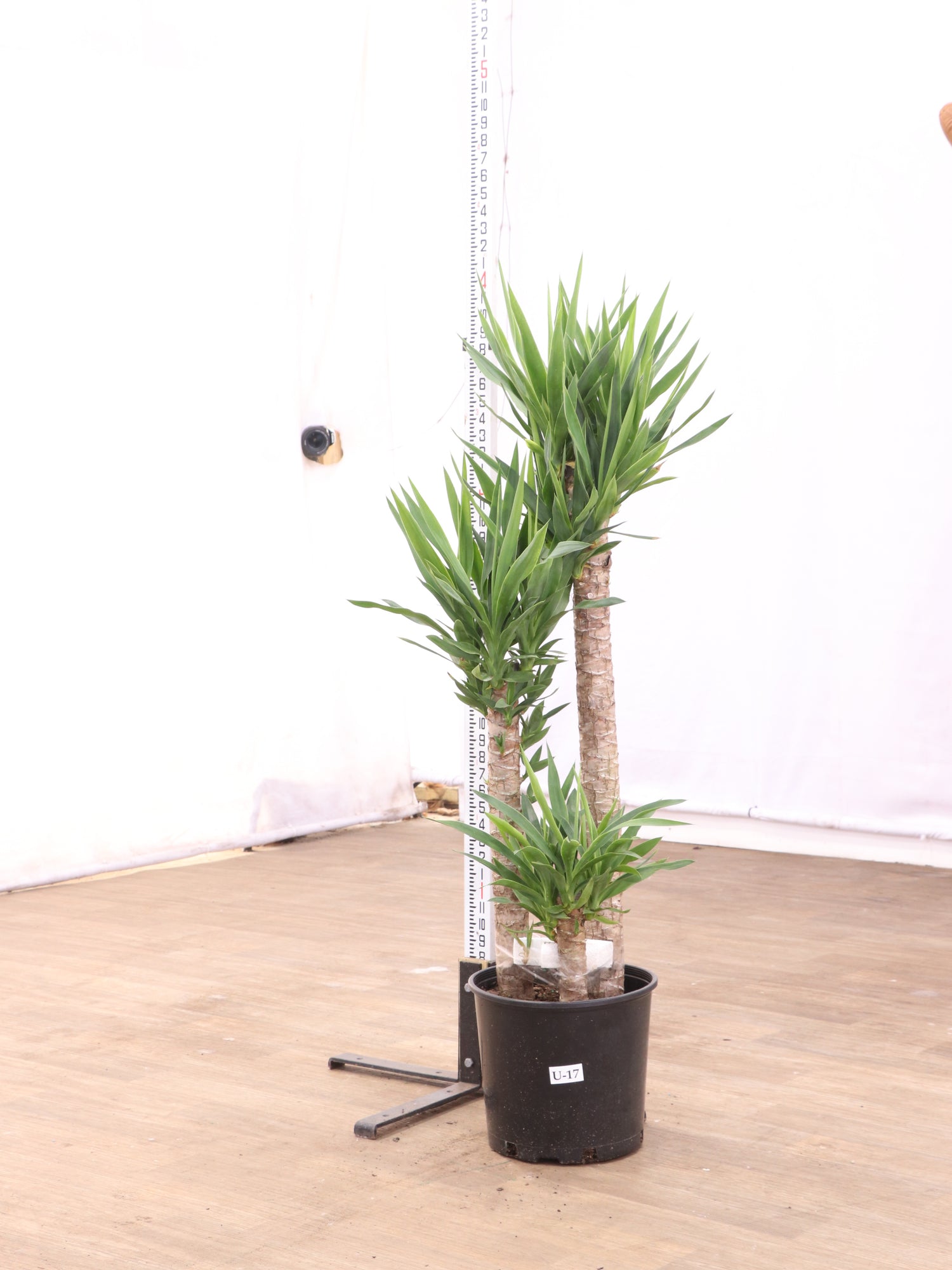
is yucca cane an indoor plant Large Yucca CaneDescription The Yucca brings sculptural beauty and southwestern charm right into your home. With those distinctive sword shaped leaves arranged in perfect rosettes and the promise of towering Yucca flower spikes, this resilient beauty transforms any space into a desert inspired sanctuary. Native to the Americas and naturally adapted for easy living, your Yucca tree thrives with gentle care and understanding. We love how forgiving these plants are
Description
The Yucca brings sculptural beauty and southwestern charm right into your home. With those distinctive sword-shaped leaves arranged in perfect rosettes and the promise of towering Yucca flower spikes, this resilient beauty transforms any space into a desert-inspired sanctuary.
Native to the Americas and naturally adapted for easy living, your Yucca tree thrives with gentle care and understanding. We love how forgiving these plants are - they're wonderful companions for both new plant parents and experienced collectors who appreciate low-maintenance elegance. Whether you choose a smaller Yucca for your favorite corner or a statement-sized specimen for your living room, this plant will grow alongside you for decades, adding timeless beauty to your carefully curated space.
Care
Are yuccas hard to care for?
Yuccas are wonderfully forgiving plants that make excellent choices for both beginners and experienced plant lovers. These resilient beauties adapt well to various conditions and don't mind if you occasionally forget to water them, requiring mainly bright light and patience.
We find that most plant parents quickly fall in love with how understanding these plants are. Think of your Yucca as that low-maintenance friend who always looks great - minimal fuss, maximum beauty, and always ready to brighten your day.
Do Yuccas like full sun or shade?
Your Yucca absolutely thrives in bright light and loves soaking up full sun whenever possible, though it gracefully tolerates partial shade too. Indoors, we recommend placing it near your brightest window where it can enjoy optimal growing conditions.
The more sunshine your Yucca receives, the more likely you'll be rewarded with those spectacular sword-like leaves and potentially even those magnificent flower spikes that make these plants so special.
How often should you water yuccas?
Water your Yuccas every two to three weeks during spring and summer, allowing the top few inches of soil to dry completely between waterings. In winter, reduce watering to once monthly as these desert natives prefer staying dry.
When you do water, give it a thorough drink until water flows from the drainage holes, then let it rest. We always tell our customers that with Yucca plant care, it's better to underwater than overwater.
Where is the best place to keep a yucca plant?
The perfect home for your Yucca is near a bright, sunny window with good drainage and adequate air circulation. We love seeing them in entryways, living rooms, or anywhere their stunning silhouette can create a natural focal point.
Choose a spot where your plant can show off its striking beauty while staying safely away from cold drafts and heating vents. Your Yucca will reward you with steady, graceful growth in return.
What is the best fertilizer to use for yuccas?
Feed your Yucca with a balanced, all-purpose fertilizer diluted to half strength every few months during the spring and summer growing season. Skip fertilizing completely in fall and winter when your plant naturally rests and doesn't need extra nutrients.
We recommend keeping fertilizing simple and gentle. These plants evolved in nutrient-poor soils, so less is definitely more when it comes to feeding your beautiful Yucca.
Do yuccas need misting?
Yuccas don't need misting and actually prefer the dry indoor conditions that many other houseplants find challenging. These desert natives thrive in average home humidity and excessive moisture can sometimes lead to fungal issues on their leaves.
Save your spray bottle for other plants - your Yucca is perfectly content with the natural humidity levels in your home and will thank you for respecting its low-moisture preferences.
How long do yuccas live for?
Your Yucca can become a treasured long-term companion, often living for several decades with proper care and sometimes reaching fifty years or more. We love knowing that these plants can grow alongside families, becoming more beautiful with each passing year.
This makes them wonderful investments for anyone looking to create lasting beauty in their space. There's something deeply satisfying about nurturing a plant that can be part of your home for decades.
Are yuccas good indoor plants?
Yuccas make absolutely wonderful indoor plants thanks to their striking sculptural presence, remarkable resilience, and refreshingly low maintenance requirements. They bring that perfect combination of dramatic visual impact and easy-going personality that works beautifully in modern homes and offices.
We particularly appreciate how well they adapt to typical indoor conditions that challenge many other houseplants. Your Yucca will thrive in the dry air and bright light that most homes naturally provide.
Pet-friendly?
Yuccas are not pet friendly. They contain compounds called steroidal saponins that are harmful to pets if ingested. For the wellbeing of your furry family members, please keep these beautiful plants safely out of reach of curious paws and mouths.
Are yuccas poisonous to dogs?
Yuccas are toxic to dogs due to steroidal saponins found throughout the plant. If your pup decides to sample the foliage, they may experience drooling, vomiting, diarrhea, and weakness that requires immediate veterinary attention for their safety.
We always recommend positioning your Yucca where even the most curious dogs can't reach it - perhaps on a high plant stand or in a room that's typically off-limits to your four-legged friends.
Are yuccas toxic to cats?
Yuccas are definitely harmful to cats, potentially causing drooling, vomiting, diarrhea, and weakness if your feline friend decides to investigate with their teeth. Since cats are natural climbers and plant explorers, extra care is needed with placement.
Consider a high shelf or hanging arrangement where your kitty can admire your Yucca's beautiful form from a safe, non-nibbling distance. Your cat's safety is always worth the extra planning.
Factoids
What is a yucca plant?
A Yucca plant is a perennial evergreen with rosettes of sword-shaped leaves and occasional tall spikes of fragrant white or cream flowers. These beauties belong to the asparagus family and are native to arid regions throughout North and Central America.
Is a yucca a cactus?
A Yucca isn't actually a cactus, despite their shared appreciation for dry conditions and desert landscapes. While cacti belong to the Cactaceae family, Yuccas are proud members of the asparagus family, making them botanical cousins rather than siblings.
Is yucca a perennial or an annual?
Your Yucca is definitely a perennial plant, meaning it will grace your home for many years rather than completing its life cycle in just one season. This long-term commitment makes it such a rewarding choice for anyone wanting to build lasting relationships with their plants.
Are yuccas poisonous to humans?
Yuccas contain saponins that can cause stomach upset, vomiting, and diarrhea in humans if consumed in significant quantities. The naturally bitter taste usually prevents accidental consumption, but it's wise to keep them away from curious children and adults who might experiment.
We always recommend treating all houseplants as "look but don't taste" and washing hands after handling any plant, just to be safe and maintain good plant care habits.
Do yucca plants multiply?
Yucca plants naturally multiply by producing small offshoots or pups around the base of the mother plant. You can separate them when they're large enough. Many species spread through underground rhizomes, while others can grow from stem cuttings with patience.
This natural tendency to produce new plants makes them wonderful for sharing with friends or expanding your own collection over time. There's something magical about watching a single plant become many.
Can you eat yucca?
You cannot eat the Yucca plant root, which contains high levels of toxic saponins. It’s often confused with edible yuca or cassava. Some Yucca flower varieties are used in traditional Central American and Mexican cuisines when prepared by experienced cooks.
We always recommend leaving any food preparation involving plant materials to experts and treating your houseplant Yucca as purely ornamental for safety and peace of mind.
Do Yuccas purify the air?
Yuccas help improve your indoor air quality by naturally filtering toxins like formaldehyde and benzene from your environment, contributing to a healthier home atmosphere. Those broad leaves work quietly to process the air around them throughout the day and night.
While they're not the strongest air purifiers in the plant world, every little bit helps, and you get the added bonus of stunning architectural beauty alongside their air-cleaning benefits.
What part of yuccas are medicinal?
The root of certain Yucca species, particularly Yucca schidigera, contains beneficial compounds that have been studied for their anti-inflammatory properties. However, the raw root itself isn't safe for home consumption and requires professional preparation for any medicinal use.
We always recommend leaving medicinal plant preparation to qualified professionals and enjoying your beautiful houseplant Yucca purely for its ornamental qualities and air-purifying benefits.
Buy a Yucca
Your perfect Yucca is waiting to transform your space into something extraordinary. These remarkable plants bring decades of beauty with surprisingly little effort – exactly what busy plant lovers need.
We help you discover the Yucca that matches your vision perfectly.
Our live video calls mean you'll actually see your chosen plant growing in our greenhouse before we carefully pack it for the journey to you. There's something wonderful about knowing exactly which plant will be arriving at your door. We believe the best plant relationships start with the right match, and we're excited to help you begin this beautiful, long-lasting partnership.
Shipping Notes
- Free Standard Shipping on $100+ Orders to the USA.
- Except Preorder products are shipped in 48 hours.
- Delivery to the USA:
- Standard Shipping : 3-10 business days
- If time is of the essence, please consider selecting expedited delivery for faster service.
Exchange/Return Notes
- We offer a 30-day return/exchange service after receiving.
- Final sale items are not eligible for returns or exchanges.
- To process your return/exchange, please contact us at [email protected]
- Please click here for more details>>> Return & Exchange Policy