Pay in installments of $5.71 with
 ,
,
 and
and

Shipping Estimate
USA
- USA
- CAN
- USA
- CAN
Ships within 48 hours · Estimated delivery Aug 6 - Aug 11
 Promo Codes Available:
For Your Every Summer RSVP, with Code: SUMMER15
Description
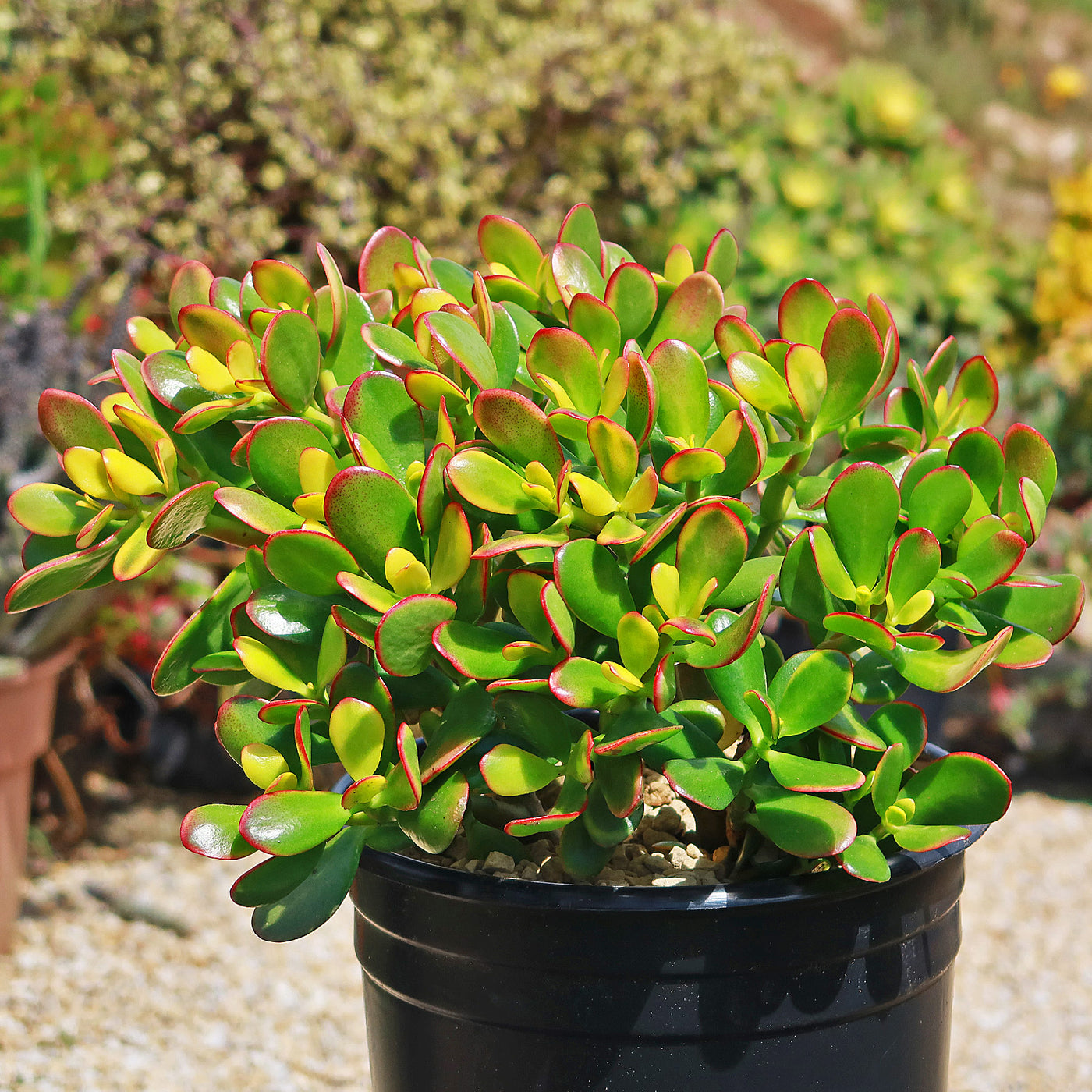
crassula argentea jade plant Botany Bay Jade PlantThe Botany Bay Jade plant, known as the Crassula ovata 'Botany Bay', is a popular Jade plant known for its unique foliage and low maintenance care. This Crassula succulent is one of the most widely distributed flowering succulents out there. Additionally, "Botany Bay" is the name of a location in Australia where significant botanical discoveries were made. This image features a lush, mature Botany Bay Jade plant with tightly packed, glossy green
The Botany Bay Jade plant, known as the Crassula ovata 'Botany Bay', is a popular Jade plant known for its unique foliage and low-maintenance care. This Crassula succulent is one of the most widely distributed flowering succulents out there. Additionally, "Botany Bay" is the name of a location in Australia where significant botanical discoveries were made.
In Chinese culture, Crassula ovata is known as the "money tree" or "feng shui money tree" and is believed to bring good luck and financial prosperity to those who grow it.
This money plant is often given as a gift during the Chinese New Year or other auspicious occasions.
Native to South Africa and Mozambique, this evergreen beauty can grow up to 3 feet tall and 2 feet wide, depending on its conditions (so make sure you give it plenty of root space!).
During summertime, those glossy green tubular leaves shine brightly, but as we head into cooler temperatures, those edges start turning red - talk about stunning!
The star-shaped flowers of the jade plant bloom in late winter to early spring with white flowers that create an eye-catching contrast between open blossoms and closed buds. These pollinated flowers produce seeds enclosed in these buds.
Money tree plants are exceptionally easy to propagate by leaf or stem cuttings, so you can quickly grow your collection with just a few simple steps.
The jade succulents typically go dormant during the winter months, from late fall to early spring. During this period, the plant will stop growing and may lose some of its leaves. This is a natural process and is not harmful to the plant. To encourage its growth during dormancy, the plant should be kept in a cool, dark location and reduced watering.
So, whether you call it a jade plant, lucky plant, or money tree, Crassula ovata is definitely worth adding to your collection!
When and How to Water Your Botany Bay Jade Plant
The Botany Bay Jade plant succulent is naturally drought-tolerant, having evolved to store water in its thick, fleshy leaves. This makes it particularly well-suited to indoor environments where frequent watering isn’t ideal. Like most succulents, it thrives when watered using the soak-and-dry method, thoroughly saturating the soil and allowing it to dry out completely before the next watering. The Crassula ovata ‘Botany Bay’ prefers watering 10-14 days once every growing season, and once every 3-4 weeks in the dormant season.
In spring and summer, during the active growing season, the jade plant will appreciate slightly more frequent watering once every 10 to 14 days. Always check the soil moisture before watering. If the top 2 inches are dry and the pot feels noticeably lighter, it’s time to water again. Bright, indirect light and warm indoor temperatures will also cause the plant to use water more quickly during this time.
In fall and winter, during the dormant season, growth slows considerably, and so should your watering routine. Watering once every 3 to 4 weeks is often sufficient, especially in cooler homes where evaporation is slower. Be extra cautious during this period; moist, cold soil is a recipe for root rot. Reduce watering frequency and avoid misting or adding humidity, as this succulent prefers dry air year-round.
Light Requirements - Where to Place Your Jade Plant
When grown indoors, place your Jade plant in the brightest sunny place in your house, where it gets 4-6 hours of bright light daily.
Direct sunlight can scorch the new leaves off, so placing them near a window that receives filtered or indirect light is best.
The amount of light the plant receives can affect the color of its leaves. The money tree grown in bright light will have more vibrant, deep green leaves, while the foliage of those grown in lower light conditions may have a lighter, yellow-green color.
When grown outdoors, the jade plant thrives best in full sun to partial shade, for at least six hours of strong light each day to survive. However, partial shade in the afternoon is often preferable - especially in hotter climates where the plant might become stressed by the intense heat of the afternoon sun.
The red coloration on the margins of the leaves of a Jade plant is a sign of stress; it's usually not harmful to the plant and will often disappear once the plant is returned to the bright sunlight.
Optimal Soil & Fertilizer Needs
The Botany Bay jade plant prefers sandy, well-drained soil and should be fertilized once a year in the spring. Planet Desert specializes in succulents and has specialized succulent potting soil that includes an organic substrate with mycorrhizae to help with the growth of a healthy root system to help your new plants and succulents thrive.
When it comes to fertilizing your Crassula ovata, it only needs a small amount of fertilizer applied once a year in spring. Succulent plants prefer a fertilizer with lower doses of NPK, with a maximum ratio of 5-10-5, higher in phosphorus than nitrogen.
Hardiness Zone & More
In the United States, this Botany Bay Jade Plant is mostly an indoor plant, but if you live in southern Florida or Hawaii, then you can cultivate it outdoors in USDA zones 9-11.
The jade plant, on the other hand, cannot handle frost, cold, or freezing temperatures, so make sure it doesn't get below 45 degrees F in its environment.
As desert dwellers, the jade plant enjoys hot temperatures and high humidity, but can tolerate lower humidity as well. They prefer constant temperatures above 70 degrees Fahrenheit and can tolerate triple digits in the summer, so don't worry if your succulents get too hot.
In terms of coloration, Jade plants can display different colors depending on the temperature. When the plants are exposed to cooler temperatures, the leaves may turn reddish or purplish in color. This reddish tint on smooth, fleshy leaves is a natural response to cooler temperatures and is not harmful to the plant.
How to Grow Best Botany Bay Jade Plant Indoors
Botany Bay Jade plants thrive in temperatures between 65-75°F during the day and slightly cooler temperatures at night. Make sure to place them in a bright, indirect light location to encourage healthy growth. Avoid overwatering by allowing the soil to dry out between waterings to prevent root rot.
Wildlife - Jade Plant Flowers Attract the Following Friendly Pollinators
Jade plant flowers are known to attract a variety of friendly pollinators, including bees, butterflies, and hummingbirds. These creatures are drawn to the sweet nectar and vibrant colors of the flowers, helping to facilitate pollination and promote the growth of new plants. Additionally, the presence of these pollinators can contribute to a healthy ecosystem and biodiversity in the surrounding area.
According to ASPCA, the Crassula ovata 'Botany Bay' jade plant is considered mildly toxic to pets and humans. However, it is safe to touch and handle, making it a popular choice for indoor houseplants.
How to Propagate Your Crassula ovata 'Botany Bay' Jade Plant
To propagate your Crassula ovata 'Botany Bay' Jade Plant, you can take stem cuttings from a healthy, mature plant. Make sure the cutting is at least 3-4 inches long and allow it to dry for a few days before planting it in well-draining soil. Water sparingly until roots develop, then gradually increase watering as the plant establishes itself.
Key Takeaways
- Botany Bay Jade has a compact, upright growth habit, forming dense clusters of fleshy green leaves with reddish edges in bright light.
- This variety is considered a symbol of prosperity and good luck, often used as a Feng Shui “money plant” in homes and offices.
- It is highly drought-tolerant, storing water in its thick leaves and requiring only infrequent watering.
- The plant responds well to pruning and shaping, making it a popular choice for bonsai-style training and container displays.
- Its low-maintenance nature and attractive form make it an excellent choice for beginners or busy plant lovers.
The Bottom Line
Overall, the Botany Bay Jade Plant is a resilient, slow-growing succulent prized for its compact shape and dense clusters of bright green, fleshy leaves that often develop red margins in full sun. Its tidy growth habit makes it ideal for containers, small spaces, or bonsai training. With its drought tolerance, low-maintenance needs, and ornamental appeal, Botany Bay is a reliable and attractive choice for both beginner and experienced plant owners looking to add a touch of structure and vibrant greenery to their indoor collection.
Shipping Notes
- Free Standard Shipping on $100+ Orders to the USA.
- Except Preorder products are shipped in 48 hours.
- Delivery to the USA:
- Standard Shipping : 3-10 business days
- If time is of the essence, please consider selecting expedited delivery for faster service.
Exchange/Return Notes
- We offer a 30-day return/exchange service after receiving.
- Final sale items are not eligible for returns or exchanges.
- To process your return/exchange, please contact us at [email protected]
- Please click here for more details>>> Return & Exchange Policy